
A Zoho to Bitrix24 migration moves your users, leads, accounts, contacts, deals, tasks and notes from Zoho CRM into Bitrix24, then rebuilds your pipelines, automations and integrations on the new side. Records can be moved with the free migration app in the Bitrix24 Market or with CSV import. The data transfer itself is the quick part. Most of the work is cleaning the data first and rebuilding how your team works.
We are Digitalz, a Dubai-based Bitrix24 Gold Partner, and most of the companies we work with are real estate brokerages. "Can we move our Zoho data across, and what happens to duplicates?" comes up on our sales calls again and again. This guide answers it step by step, with the UAE details that generic migration guides leave out: portal leads, WhatsApp chats, RERA documents and the UAE PDPL.
What moves and what you rebuild
Think of a migration in two halves. The first half is data: the records your agents and managers have built up over the years. The second half is configuration: the pipelines, fields, rules, reports and connections that make the CRM work day to day. Data can be transferred. Configuration almost always has to be rebuilt, because Zoho and Bitrix24 store it in different ways.
| In Zoho | In Bitrix24 | How it moves |
|---|---|---|
| Users and roles | Employees, departments and access permissions | Users can be created by the migration app; permissions are checked and set by hand |
| Leads | Leads (or straight into deals) | Migration app or CSV import |
| Accounts | Companies | Migration app or CSV import |
| Contacts | Contacts, linked to companies | Migration app or CSV import |
| Deals and stages | Deals in one or more pipelines | Records move; the pipeline stages are designed first |
| Tasks, calls, events, notes | Activities and the record timeline | Migration app; CSV only carries what fits in columns |
| Attachments | Files on the record timeline | Migration app, depending on the module |
| Workflow rules, blueprints, assignment rules | Automation rules, triggers and workflows | Rebuilt by hand |
| Web forms, portal and WhatsApp connections | CRM forms, integrations and Open Channels | Reconnected after go-live |
| Reports and dashboards | CRM analytics and reports | Rebuilt, starting with standard reports |
Two things never move on their own. The first is the logic in your head: why a lead goes to a particular agent, or when a manager gets alerted. The second is history that lives outside the CRM, such as chats on agents' personal WhatsApp numbers. Plan for both.
Why UAE teams move from Zoho to Bitrix24
Zoho CRM is well known in the UAE and plenty of teams run on it happily. These are the reasons we hear most often for moving:
- Pricing model. Bitrix24 is sold per plan with a user limit, not per seat. A brokerage that adds agents every quarter often prefers a plan price that does not change with each hire. We compare the two models in our Bitrix24 vs Zoho CRM comparison for UAE teams.
- One workspace. CRM, tasks, chat, calendar, telephony and documents sit in one Bitrix24 account, so agents do not jump between apps.
- Familiarity. Many Dubai agents have already used Bitrix24 at a previous agency, which cuts retraining time.
- Real estate setups. Separate off-plan, secondary and leasing pipelines, portal lead routing and WhatsApp in the CRM are common Bitrix24 builds in Dubai.
If you are still deciding, settle the platform question before you plan a migration. Moving data twice is the most expensive outcome.
Two ways to move the data
There are two realistic routes. Many projects use both: the app for the bulk transfer and CSV for clean-up or for records that did not come across the way you wanted.
| Migration from Zoho app (Bitrix24 Market) | CSV export and import | |
|---|---|---|
| How it works | Connects to your Zoho account through its API and copies records into Bitrix24 | You export each Zoho module to CSV, clean the files and import them through the CRM import wizard |
| Best for | Moving full history: notes, tasks, calls and attachments on the timeline | Controlled, cleaned imports; small databases; fixing records after an app run |
| Control over mapping | Limited; the app decides where most data lands | Full; you map every column to a field |
| Duplicates | Clean up first; the app copies what it finds | Duplicate policy per import: allow, replace, merge or skip |
| Stopping midway | Plan the run carefully; check the app's own notes on pausing before you start | Each file is a separate import, so you control the pace |
| Ongoing sync | No, it is a one-time, one-way transfer | No |
For CSV, Bitrix24's own help centre explains the CRM import wizard and the entities it accepts, and how to import and link companies, contacts and deals in the right order. Two details from that guidance matter a lot in practice. Links between records are made by exact name, so "ABC Properties LLC" and "ABC Properties" will not link. And an import creates new deals; it does not update deals that already exist.
Before you start: five decisions
The best migrations we run are decided on paper before anyone clicks Import. Agree these five points with the owner and the sales manager first.
1. What do you actually need to keep?
Ten years of Zoho data includes a lot nobody will open again. Decide a cut-off. A common approach is to bring every contact and every open deal, plus closed deals from the last two or three years, and archive the rest as a CSV export you keep on file.
2. Leads, deals or both?
In Bitrix24, leads are for qualification (budget, requirements, decision maker, timeline) and deals are where the sale happens. Many Dubai brokerages now skip the lead stage and work straight in deals, because agents lose track switching between sections. Decide this before mapping, because it changes where every Zoho lead lands.
3. How many pipelines?
One Zoho pipeline with 14 stages usually becomes three shorter pipelines in Bitrix24: off-plan, secondary and leasing. Each has its own stages and its own required fields. Fewer stages are better; each stage should mark a real step forward in the sale.
4. Who owns which records?
Every record needs a responsible person. If an agent has left, decide who inherits their contacts before import, not after.
5. When is the cutover?
Pick a quiet window. In Dubai that usually means a weekend, and not the week before a big launch or straight after Eid when follow-ups pile up.
Zoho to Bitrix24 migration, step by step
This is the sequence we follow. It works for a 5-agent team and for a 60-agent team; the larger team simply spends longer on steps 2 and 7.
- Audit Zoho. List every module in use, every custom field, every workflow rule, blueprint and assignment rule, every web form and every integration. Note which ones people actually use, and leave unused fields behind.
- Clean the data in Zoho. Merge duplicate contacts, standardise phone numbers to the +971 format, fix company names and close dead deals. Cleaning before export is far easier than cleaning in two systems.
- Design Bitrix24 first. Build the pipelines, stages, custom fields, departments and roles in Bitrix24 before any data arrives. Data needs somewhere to land.
- Map fields. Write a simple mapping sheet: Zoho field, Bitrix24 field, field type, notes. Drop-down values must match exactly, so list them too. See the mapping table below.
- Create users. Invite every employee, assign departments and set access permissions so agents see only their own records.
- Run a test import. Take 50 to 100 records of each type into a test pipeline. Open them one by one. Check that contacts link to companies, deals link to contacts, phone numbers are clickable and owners are correct.
- Import in order. Companies first, then contacts, then deals, then activities. Bitrix24 can only link a record to one that already exists.
- Check duplicates. Run duplicate search on contacts by phone and email after the import and merge what remains.
- Freeze Zoho and run a delta. On cutover day, stop new entries in Zoho, export everything created or changed since the main import and bring that across.
- Switch inbound channels. Point web forms, portal leads, WhatsApp and telephony to Bitrix24. Send a test lead through each one.
- Train and go live. Short, role-based sessions: what an agent does, what a team lead checks, what the owner sees. Record them for future hires.
- Keep Zoho read-only for a period. Keep access for a few weeks so anyone can check an old note, then export a final archive and close it.
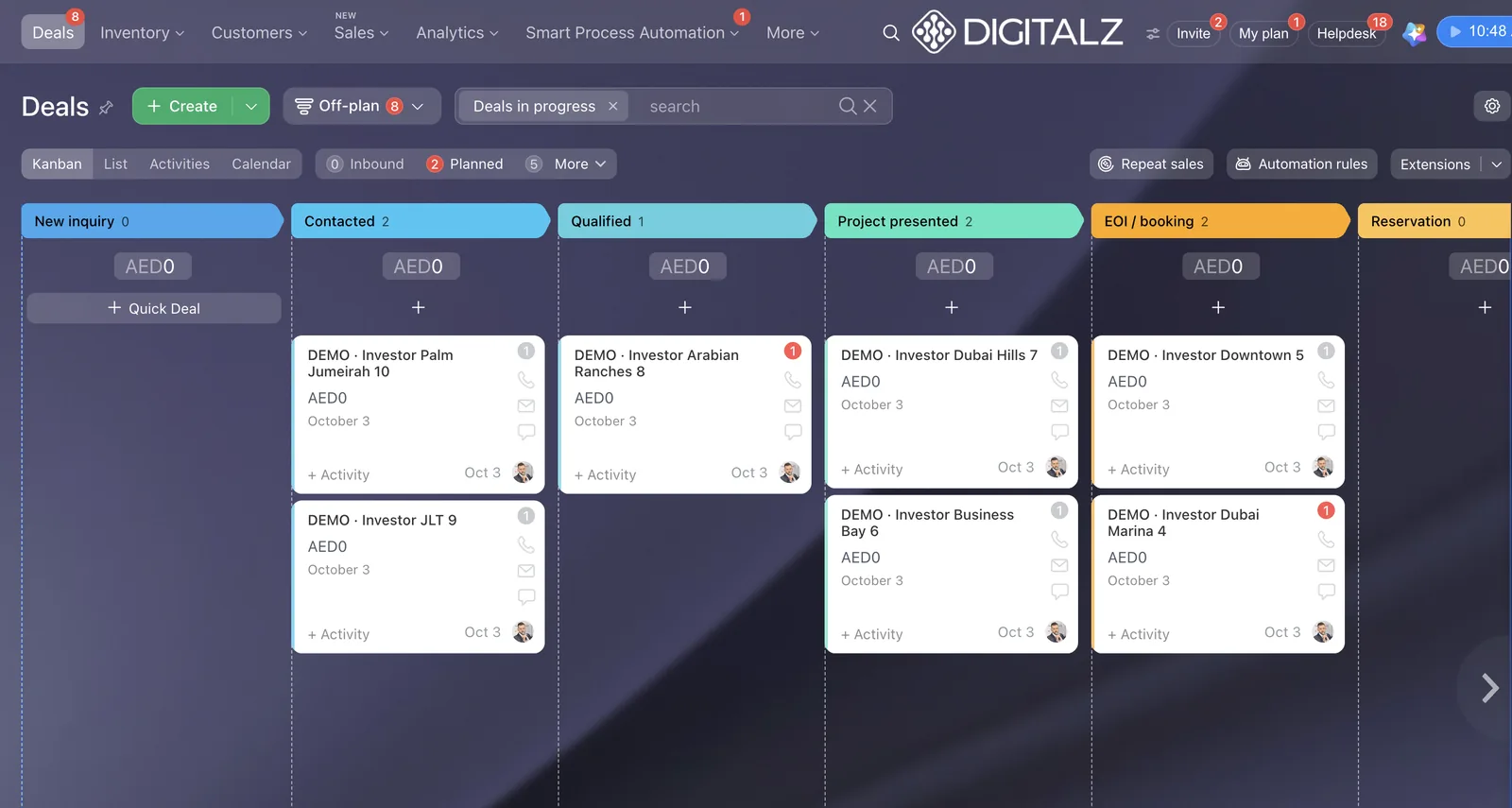
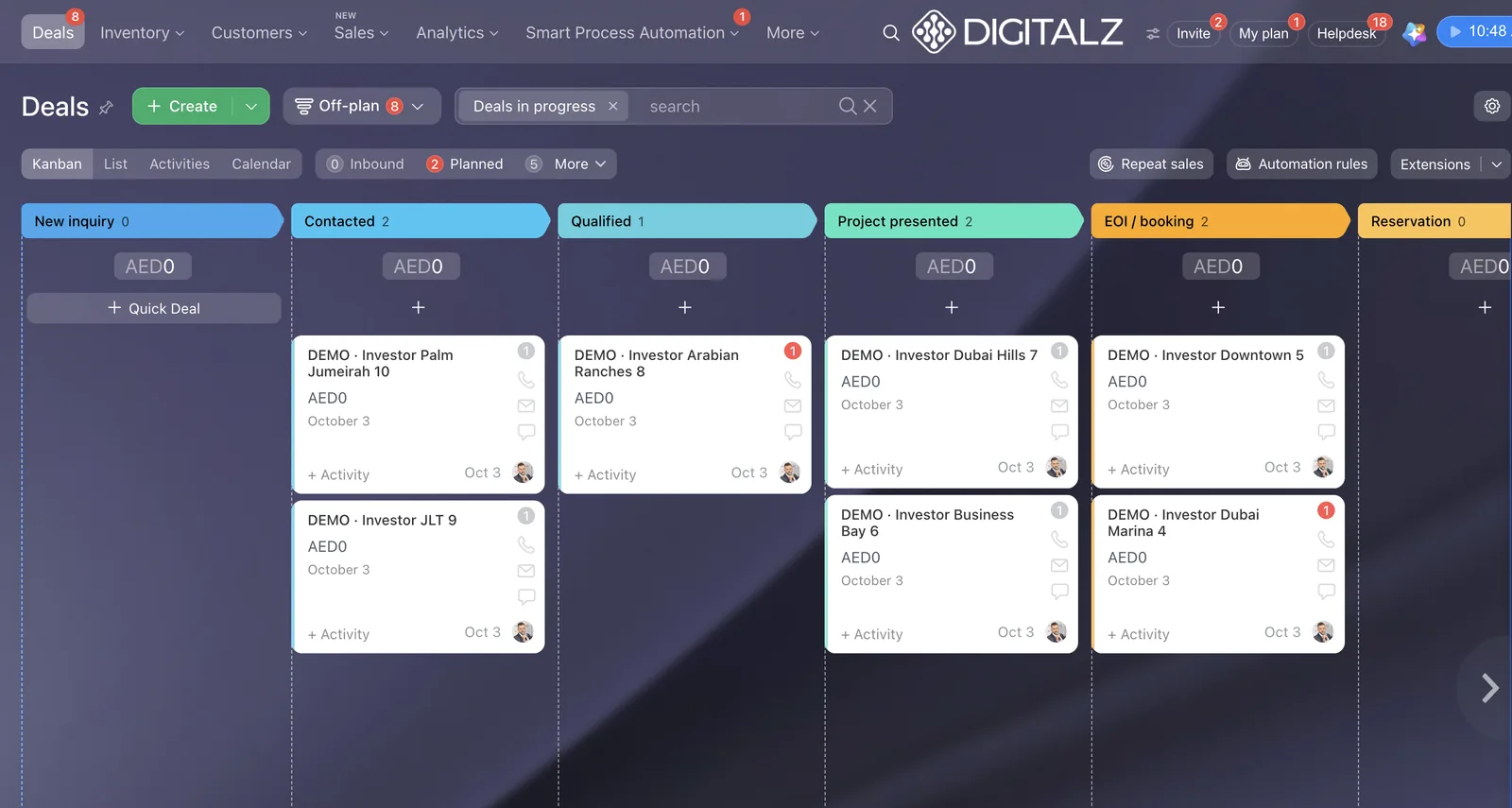
The image above shows what a rebuilt off-plan pipeline looks like in Bitrix24: deals grouped by stage, so a manager sees at a glance where each enquiry sits. This is the structure your Zoho deals should land in, which is why step 3 comes before any import.
Field mapping for a Dubai brokerage
Most migration problems are mapping problems. Here is a starting point for a UAE real estate team. Your own field names will differ, but the logic holds.
| Typical Zoho field | Bitrix24 field | Notes |
|---|---|---|
| Lead Source | Source | Match values exactly: Property Finder, Bayut, Dubizzle, Website, Referral, Walk-in |
| Lead Owner / Deal Owner | Responsible person | Users must exist in Bitrix24 first; reassign leavers before import |
| Mobile | Phone (mobile) | Use +971 format so click-to-call and WhatsApp matching work |
| Nationality, Language | Custom list fields | Useful for routing leads to language teams |
| Budget | Deal amount or custom money field in AED | Keep currency as AED; check decimals |
| Property type, Community, Bedrooms | Custom list fields | Agree one spelling per community, for example Dubai Marina, JVC, Business Bay |
| Listing reference | Custom string field | Keeps the link between a portal enquiry and the listing agent |
| Form A / Form B status and expiry | Custom date and list fields | Allows expiry reminders as an automation later |
| Ejari or Oqood number | Custom string field on the deal | Store on the deal, not the contact |
| Stage | Pipeline stage | Map old stages to new, fewer stages; send dead ones to a lost stage with a reason |
| Lost reason | Lost stage or lost reason field | Lost reasons become a marketing diagnostic once they are consistent |
A quick rule for drop-downs: if a Zoho value has no exact match in Bitrix24, the import either leaves it empty or creates a mess. Fix the list in Bitrix24 first, or clean the values in the CSV before upload.
Rebuilding automations, portals and WhatsApp
This is where a migration either improves how the team works or simply copies old habits into a new tool. We treat it as a chance to rebuild only what earns its place.
Automation rules
Zoho workflow rules and blueprints do not transfer. List what each one did, then rebuild the useful ones as Bitrix24 automation rules and triggers. For a brokerage, the core set is usually: new enquiry alert to the agent, a first-contact deadline, escalation to the team lead if nobody responds, and reminders for follow-ups and document expiry.
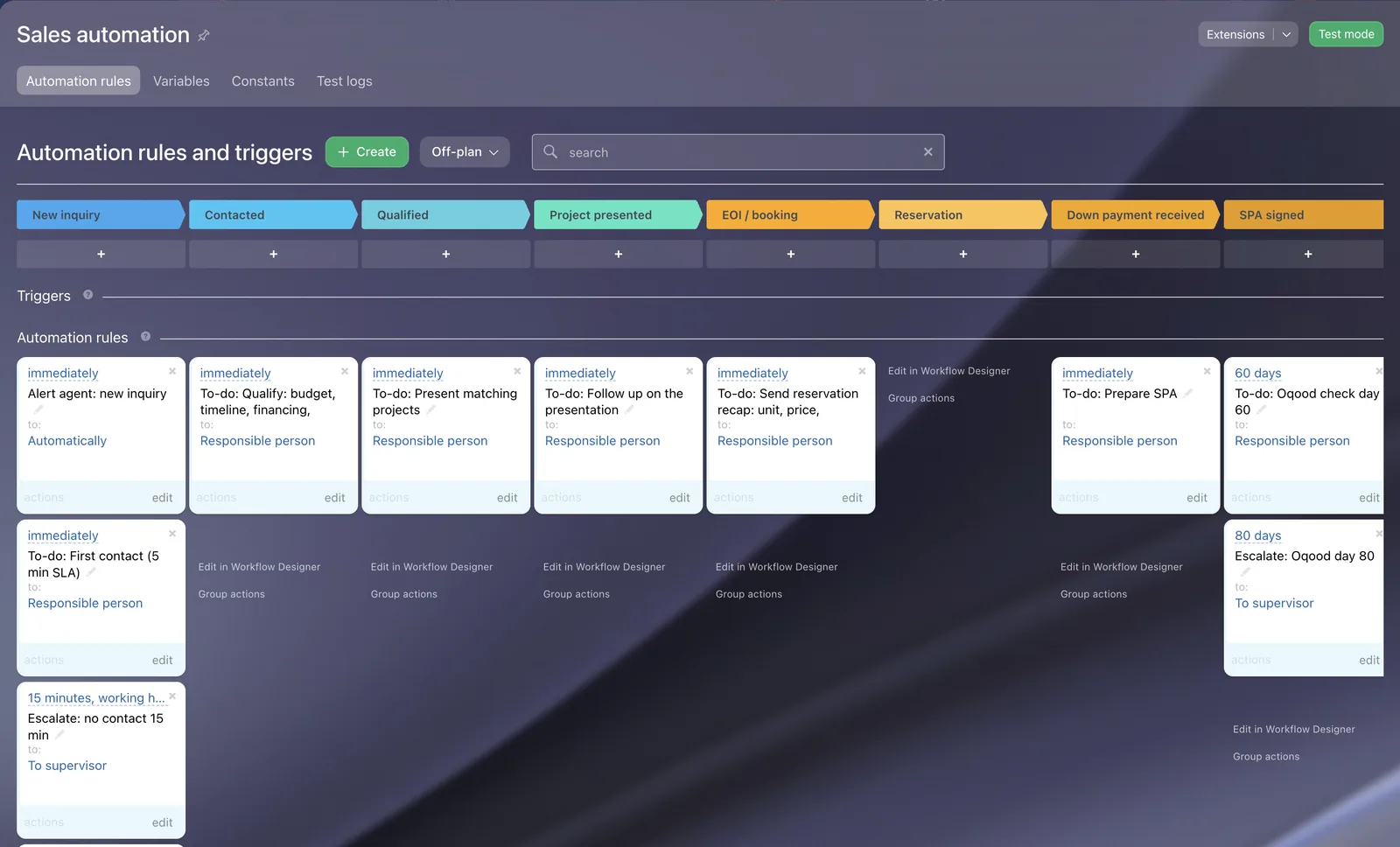
Speed to lead matters here. One buyer told us that with 100 leads a day there is a 10 to 15 minute window to convert them. Rules like the ones above make that window visible: the agent gets the lead, has a short deadline to make first contact, and the manager hears about it if the deadline passes.
Lead distribution
Zoho assignment rules become Bitrix24 distribution rules. A pattern that works in Dubai: portal enquiries go to the listing agent and stay there, while ad leads rotate round robin within a team, and language teams keep the leads from their own campaigns.
Property Finder, Bayut and Dubizzle
Portal connections are reconnected to Bitrix24 after go-live. Plan the switch so no enquiry falls between the two systems on cutover day. Our Property Finder CRM integration service covers this, and our guide on connecting Property Finder to Bitrix24 walks through field mapping and routing.
If your agents chat with clients on personal WhatsApp numbers, those chats are not in Zoho and will not migrate. Use the move as the moment to bring WhatsApp into the CRM, with one company number where each agent sees only their own chats and managers see all of them. We set this up as a separate service: WhatsApp connected to Bitrix24 for real estate.
Reports
Do not rebuild every Zoho report on day one. Start with the standard Bitrix24 reports, and add a custom one only when a manager asks for a number that is missing. An agent leaderboard is usually the first one worth adding.
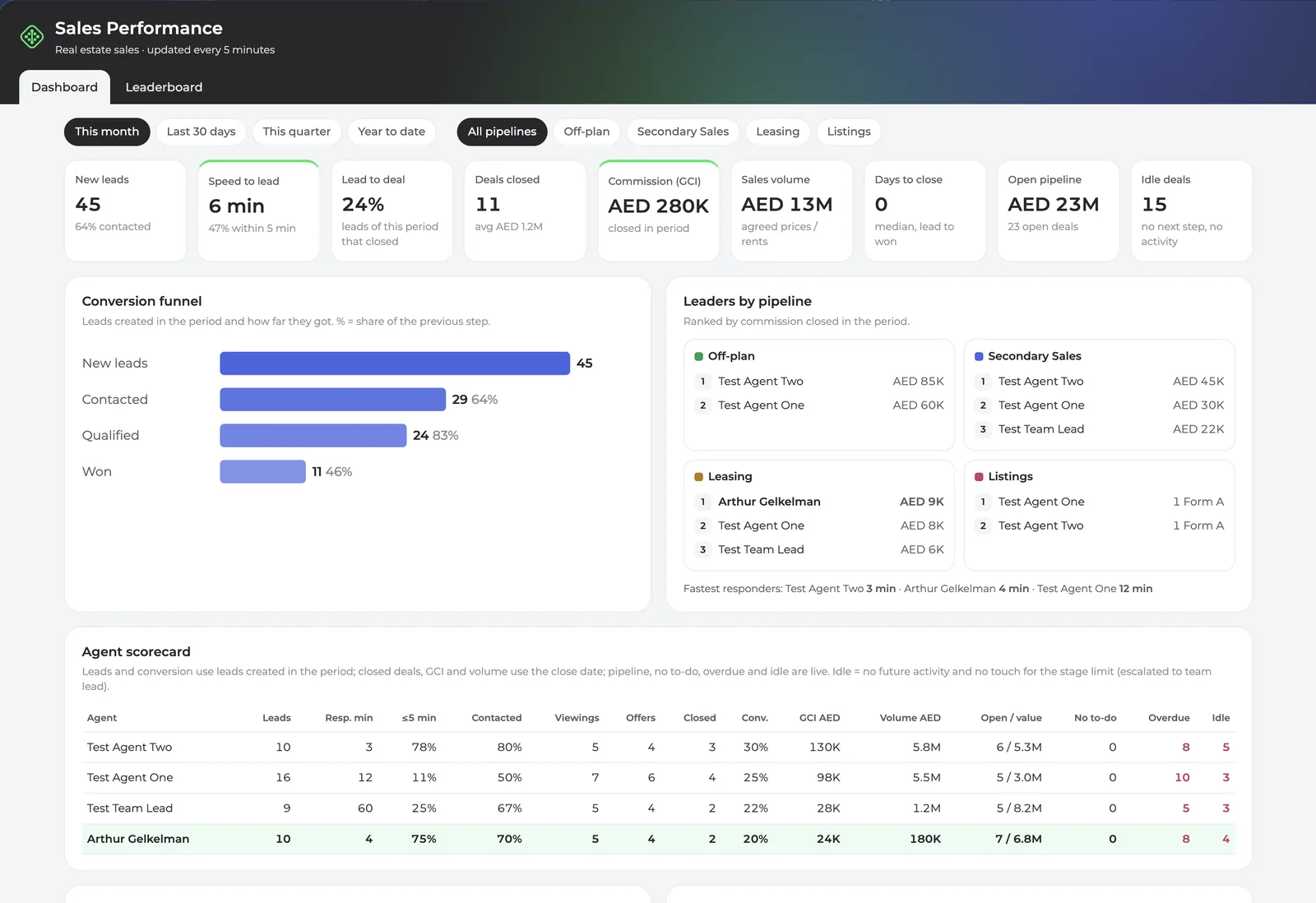
A dashboard like this one is what owners usually want to see a few weeks after go-live: new leads, speed to lead, deals closed and how each agent is performing. It only works if stages, sources and owners were mapped cleanly during the migration.
Data protection and the UAE PDPL
A migration copies personal data from one system to another, so treat it as a data processing activity in its own right. The UAE Personal Data Protection Law (Federal Decree-Law No. 45 of 2021) requires that personal data is processed for a specific purpose, kept accurate and secure, and not kept longer than needed. It also sets conditions for moving personal data outside the UAE. In practice, for a CRM move:
- Export files are the weak point. CSV exports with client names and phone numbers should not sit in email inboxes or shared drives. Keep them in one controlled folder and delete them once the import is verified.
- Bring only what you need. The cut-off decision in step 1 is also a data minimisation decision.
- Check where data is hosted. Confirm the data centre region of your Bitrix24 account and ask your legal adviser whether your setup needs any additional steps for cross-border transfer.
- Lock down access. Set role permissions so agents see only their own records, deny export to agents, and rely on the change history to see who edited what.
- Control partner access. Sign an NDA with your implementation partner, and remove the partner's access after go-live if you prefer.
This is general information, not legal advice. If your brokerage handles large volumes of personal data or transfers it abroad, take advice from a UAE data protection lawyer.
How long it takes and what it costs
Timelines depend on data quality and the number of things to rebuild, not on record counts. From our own projects:
| Scope | Typical duration | What drives it |
|---|---|---|
| Small team, clean data, one pipeline | 3 to 10 working days | Mapping and a test import |
| Typical brokerage, several pipelines, automations | 2 to 4 weeks | Pipeline design, automations, training |
| Adding IP telephony through a SIP trunk | Plus 7 to 10 days | Provider set-up for the trunk and numbers |
Cost has three parts: the Bitrix24 subscription, any third-party subscriptions (WhatsApp per number, telephony per user) and the one-time implementation, which includes the migration. From the second year you pay only the subscriptions. We break this down in AED in our guide to Bitrix24 implementation cost in the UAE. For current Bitrix24 plans and setup, see our Bitrix24 implementation service in Dubai.
Expect an adjustment period after go-live. Agents who have used Bitrix24 before settle in within days; a team new to it usually needs two to three months before the new process feels normal. Showing required fields only at the stage where they matter speeds this up.
Common migration mistakes
- Importing before designing. Data lands in a default pipeline and has to be moved again.
- Copying every Zoho field. Unused fields clutter forms and slow agents down. If nobody filled it in the last year, leave it behind.
- Ignoring phone formats. Numbers saved as 050, 0097150 and +97150 in the same database break duplicate search, click-to-call and WhatsApp matching.
- Forgetting leavers. Records owned by agents who left end up unassigned. Reassign them in Zoho first.
- Switching portals too early. If portal leads point to Bitrix24 before agents are trained, enquiries sit untouched.
- No delta import. Records created in Zoho between the main import and go-live get lost unless you plan a final top-up.
- Treating it as an IT job. A sales manager has to own the stage definitions and rules. Otherwise the new CRM mirrors the old frustrations.
- Doing it alone without time to spare. A new Bitrix24 account is an empty sheet. If nobody in-house has a few clear weeks, use a partner; our checklist on how to choose a Bitrix24 partner in Dubai helps you compare.
Frequently asked questions
Can we migrate from Zoho to Bitrix24 without losing data?
Yes, if you plan it. Records such as leads, accounts, contacts, deals, tasks and notes can be transferred with the migration app or CSV import. What does not transfer automatically is configuration: workflow rules, blueprints, reports and integrations, which are rebuilt. A test import and a final delta import protect against gaps.
How are duplicates handled during the import?
With CSV import, Bitrix24 lets you choose a duplicate policy for each file (allow, replace, merge or skip) and pick the fields used to detect duplicates, such as phone or email. The cleaner approach is to merge duplicates in Zoho before export, then run duplicate search in Bitrix24 after import.
Do our Zoho workflows and automations come across?
No. Zoho workflow rules, blueprints and assignment rules are rebuilt as Bitrix24 automation rules, triggers and distribution rules. It is a good moment to drop the rules nobody relies on.
Can we keep using Zoho Books with Bitrix24?
Many teams move only their CRM and keep their accounting tool. Connecting Bitrix24 to an accounting system is a separate integration question; check the options with your partner during scoping.
What happens to our Property Finder and Bayut leads during the switch?
They keep arriving in Zoho until you switch the integration to Bitrix24. Plan that switch for cutover day, send a test enquiry through each portal and confirm it reaches the right agent before you close Zoho for new entries.
How long does a Zoho to Bitrix24 migration take?
For a small team with clean data, 3 to 10 working days. For a typical brokerage with several pipelines and automations, 2 to 4 weeks. Telephony through a SIP trunk adds 7 to 10 days.
Planning your move
A good Zoho to Bitrix24 migration starts with a clear design, a clean database and a tested import, then moves inbound channels one at a time. If you run a real estate brokerage, you can also start fresh on a proven setup: our Real Estate CRM in 2 business hours gives you ready pipelines on Bitrix24 Standard Vibe+. Moving your Zoho data and connecting portals or WhatsApp are separate services added after go-live.
Digitalz is a listed Bitrix24 Gold Partner with 7+ years of experience. If you would like to talk through your Zoho setup first, message us on WhatsApp at +971 50 761 5409 and we will tell you what moves, what we would rebuild and how long it should take.