
To choose a Bitrix24 partner in Dubai, run the nine checks below. The five that matter most are the partner's status in the official Bitrix24 partner directory, real experience with your industry in the UAE, a written scope of work, a clear split between the Bitrix24 licence and the partner's services, and a named support contact after go-live. A partner who passes all five will usually deliver a CRM your team keeps using. A partner who can only show a badge on their own website is a risk, however good the demo looks.
We are Digitalz, a Dubai-based Bitrix24 Gold Partner, so we are one of the partners you may be comparing. This guide sticks to checks you can run yourself, on any partner, including us. Most of the examples come from real estate brokerages, because that is where we spend most of our week, but the same checks work for any UAE company.
The short answer: nine checks
If you only have ten minutes before a partner meeting, use this list. Each point has its own section below.
- Status: the partner's level in the official Bitrix24 directory.
- Location: a UAE trade licence and people in your time zone.
- Industry: a live demo built for a business like yours.
- Scope: a written list of pipelines, automations, integrations, users and training.
- Billing: the Bitrix24 licence and the partner's services as separate lines.
- Integrations: who builds and maintains each connection.
- Access: your company owns the account, the partner works inside it.
- Adoption: how your team will use the CRM every day, and how you will see it.
- Support: who you call after go-live, and how fast they respond.
Check partner status in the official directory
Authorised partners are listed in the official Bitrix24 partner directory on bitrix24.com. You can filter by region (Africa and Middle East), country, product version (cloud or on-premise) and specialisation, such as CRM and Business Automation, Telephony and VOIP integration, or API integration and app development. A logo on a partner's website proves nothing. A listing in the directory does.
What Bronze, Silver and Gold mean
Bitrix24 publishes its rules in the Bitrix24 Partner Program policy. There are three levels, and each one has sales and training requirements. In summary, as written in the policy:
| Level | How a partner gets it | What it takes to keep it |
|---|---|---|
| Bronze | Completes the Bitrix Partner Program Tutorial and starts using Bitrix24 | Entry level, no sales minimum listed |
| Silver | At least $/€2,500 in Bitrix24 sales within 12 months, to at least two different clients, plus the Partner Sales Course | At least $/€5,000 a year in Bitrix24 sales and 400 new user seats a year |
| Gold | At least $/€10,000 in sales as a Silver partner within 12 months, a marketing plan, a case study or client testimonial, the Partner Marketing Course and a public webinar or video | At least $/€15,000 a year in Bitrix24 sales, 1,000 new user seats a year and quarterly business reviews with Bitrix24 |
So a Gold Partner has sold and supported a meaningful volume of Bitrix24 and has to keep doing so every year. That tells you the partner is active and accountable to the vendor. It does not tell you whether they know your industry or whether they will answer the phone in month three. Those are the next checks.
One more detail from the same policy: partner points decide a partner's position in the directory, not their status. The top of the list is not a ranking of fit, so read at least three listings before you shortlist.
Each listing shows the partner level, the country, the specialisations and the contact details. The Digitalz partner page on Bitrix24 is where we point anyone who wants to verify our Gold status and our 7+ years with the programme.
Check the company as well as the badge
Ask for the partner's trade licence and check it with the authority that issued it. A UAE licence means a local contract, a UAE tax invoice and someone who can visit your office.
Check UAE and industry experience
Bitrix24 is the same product everywhere. What changes is how it is set up, and that depends on what the partner has built before.
Ask for a demo with demo data
Ask the partner to open a live Bitrix24 account and walk you through a setup they built for a business like yours. You want to see working pipelines, deal cards, automation rules and dashboards, with sample data. Slides are not enough.
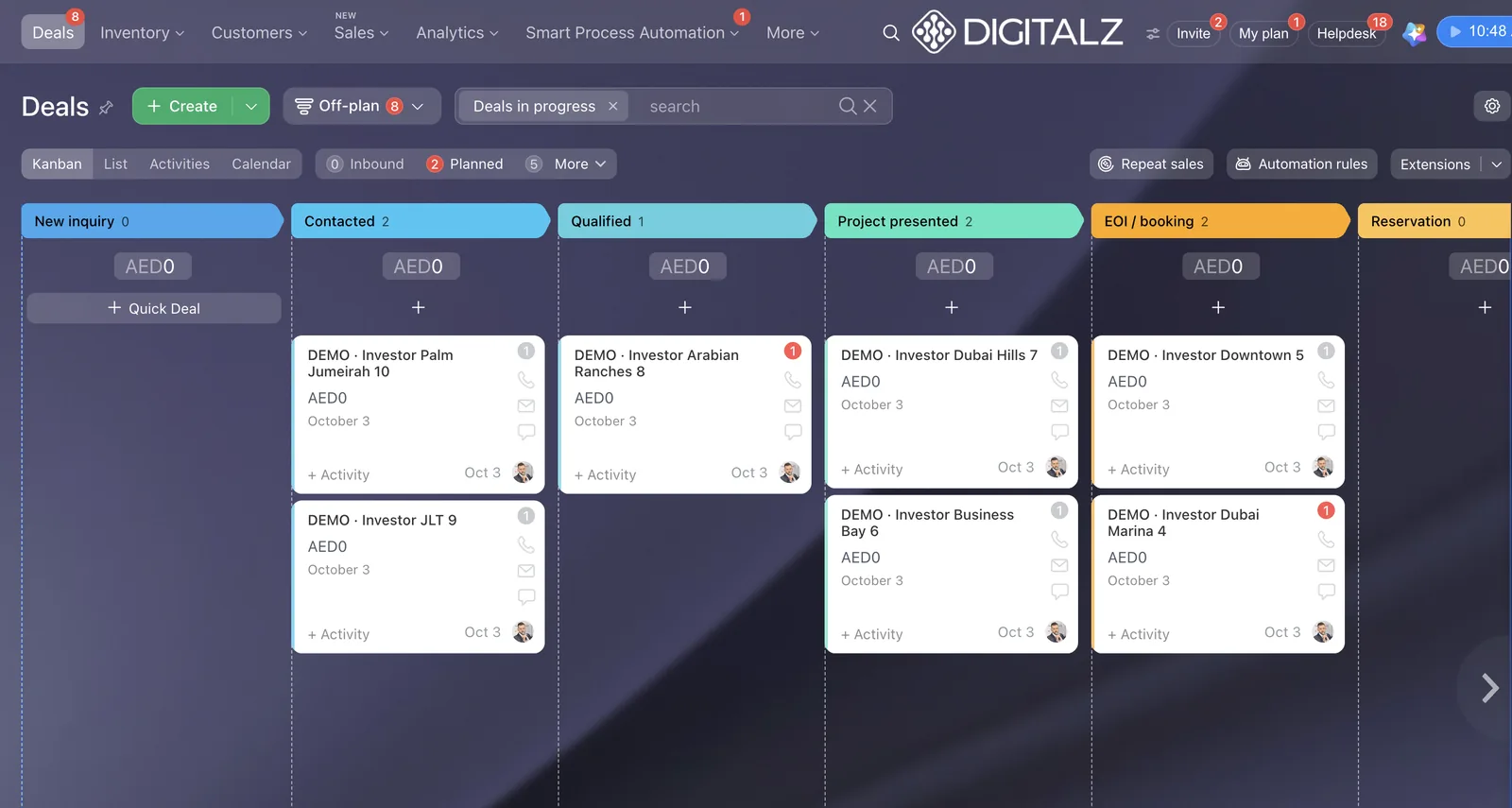
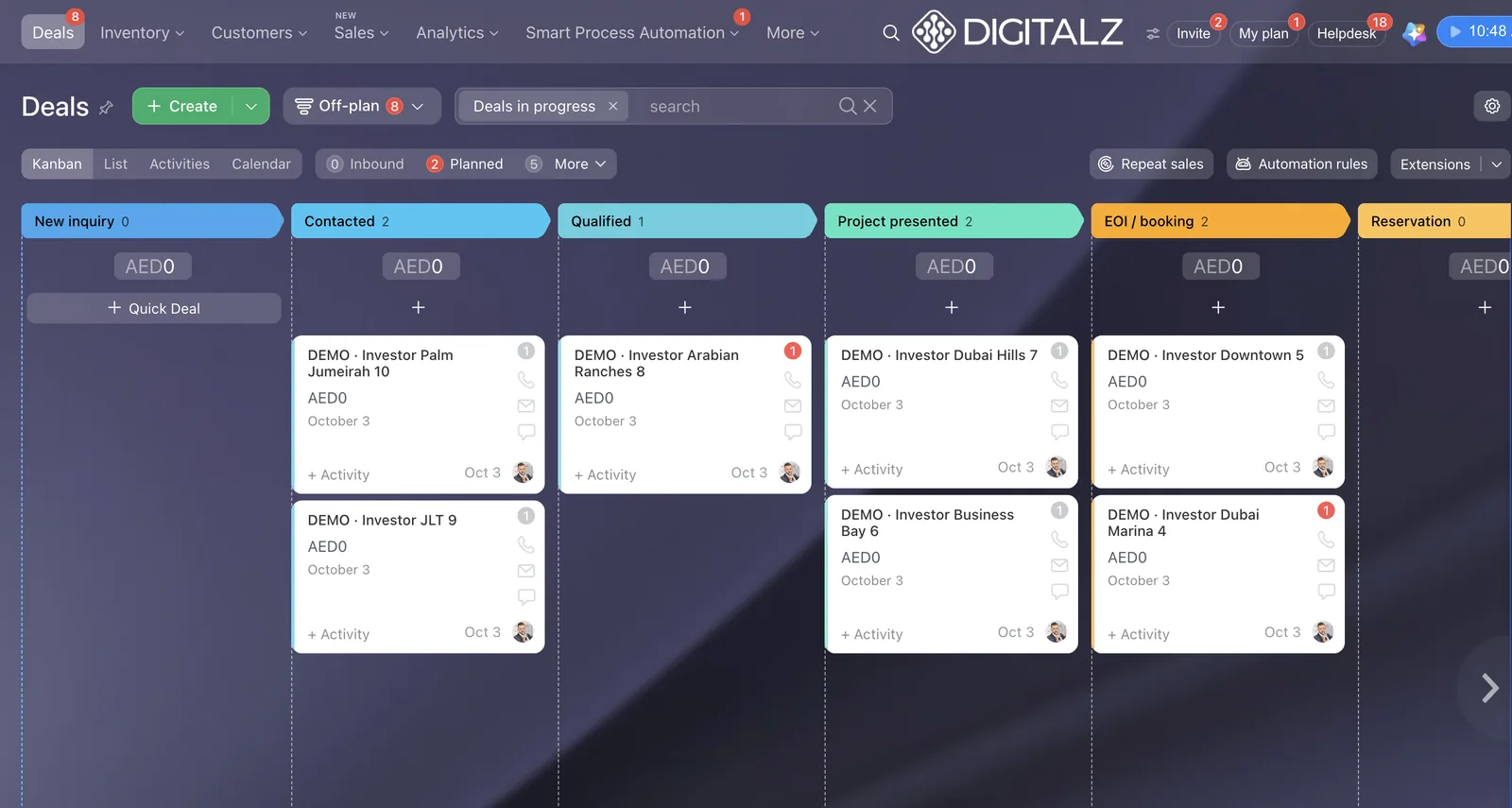
This is the off-plan pipeline from our Real Estate setup on Bitrix24, shown with demo data. Each column is a stage, from new inquiry to reservation. A partner who understands Dubai real estate will not put off-plan, secondary sales and leasing in one pipeline, because the steps and documents differ.
What UAE real estate experience looks like
If you run a brokerage, ask how their setup handles each of these. Real experience shows in quick, specific answers.
- Separate pipelines for off-plan, secondary sales, leasing and listings, each with its own stages.
- RERA paperwork at the right stage: Form A for the listing agreement with the seller, Form B with the buyer, Form F for the sale agreement, and reminders before these dates come up.
- Off-plan registration with Oqood, and tenancy contracts registered through Ejari, tracked as steps rather than notes.
- Portal leads from Property Finder, Bayut and Dubizzle that arrive with the listing reference and go straight to the right agent.
- Agent assignment by area, language or round robin, with one owner per lead.
- First-response time measured from the moment the lead arrives, with escalation to a team lead if nobody calls.
- Reactivation of cold leads after Ramadan, Eid and the summer slowdown, when many enquiries go quiet.
Our Bitrix24 Real Estate CRM page shows how we structure pipelines, fields and roles for agencies. If you are still deciding whether Bitrix24 is the right platform at all, read Best CRM for Real Estate in Dubai (2026 Guide) first, then come back to choosing a partner.
Get a written scope of work
The official directory gives the same advice we do: document your requirements, then agree a detailed statement of work and a service agreement that covers costs, timeline and terms before anything starts. Without one, everybody remembers a different version of the meeting. Our guide to Bitrix24 implementation cost in the UAE lists the items a scope of work should price.
What the scope should list
| Area | What should be written down | Why it matters |
|---|---|---|
| Pipelines | Each pipeline, its stages and what moves a deal from one stage to the next | Stops the partner building one generic funnel for every deal type |
| Fields | Required fields per stage, and drop-down values (areas, projects, unit types) | Clean data for reports, and fewer fields agents ignore |
| Automation | Every rule: trigger, action, who is notified, time limits | You know exactly what will happen when a lead arrives |
| Integrations | Each source (portals, WhatsApp, telephony, website forms) and who builds it | Avoids the "that was not included" conversation |
| Users and roles | Number of users, roles, what each role can see and export | Protects your contact database |
| Data import | What is imported (contacts, deals, listings), from which files, and who cleans them | Imports are where timelines usually slip |
| Training | Sessions for agents, team leads and admins, and the format (on site or online) | Adoption depends on it |
Separate the licence from the services
You pay for two different things: the Bitrix24 subscription, which goes to the vendor, and the partner's work. Ask for them as separate lines on the proposal, with the plan named. If the proposal shows one total with no plan named, ask why.
Bitrix24 plan prices in the UAE
The official Bitrix24 UAE pricing page (checked October 2026) lists these prices per account per month, in US dollars:
| Plan | Users included | Annual billing (per month) | Monthly billing |
|---|---|---|---|
| Standard | 50 | US$ 99 | US$ 144 |
| Standard Vibe+ | 50 | US$ 120 | US$ 199 |
| Professional | 100 | US$ 199 | US$ 289 |
| Professional Vibe+ | 100 | US$ 240 | US$ 399 |
The page says the Vibe+ prices are a launch offer for 12-month subscriptions, valid from 1 September to 10 December 2026, and cannot be combined with other discounts. Prices are per account, not per user, so the licence does not change when you add agents within the plan's limit. VAT applies on top for UAE companies.
Ask which plan the partner recommends and which features in their setup need it. A good partner will tell you when a cheaper plan is enough. Our own packages start at Standard Vibe+, because the Real Estate setup we use needs its features. You can see the current annual package price on our Real Estate CRM in 2 hours page.
Ask how integrations are built and supported
The CRM is only as good as the leads and conversations that reach it: portals, WhatsApp and calls for a brokerage, and forms, email and telephony for most other businesses.
Portal leads
Portals are where many buyers and tenants make their first enquiry. Ask the partner how a Property Finder or Bayut lead arrives: does it carry the listing reference, does it check for duplicates, does it assign an agent and start a first-contact task automatically? Our guide on how to connect Property Finder to Bitrix24 covers the setup step by step, and our Property Finder CRM integration page explains how we add it as a service after go-live.
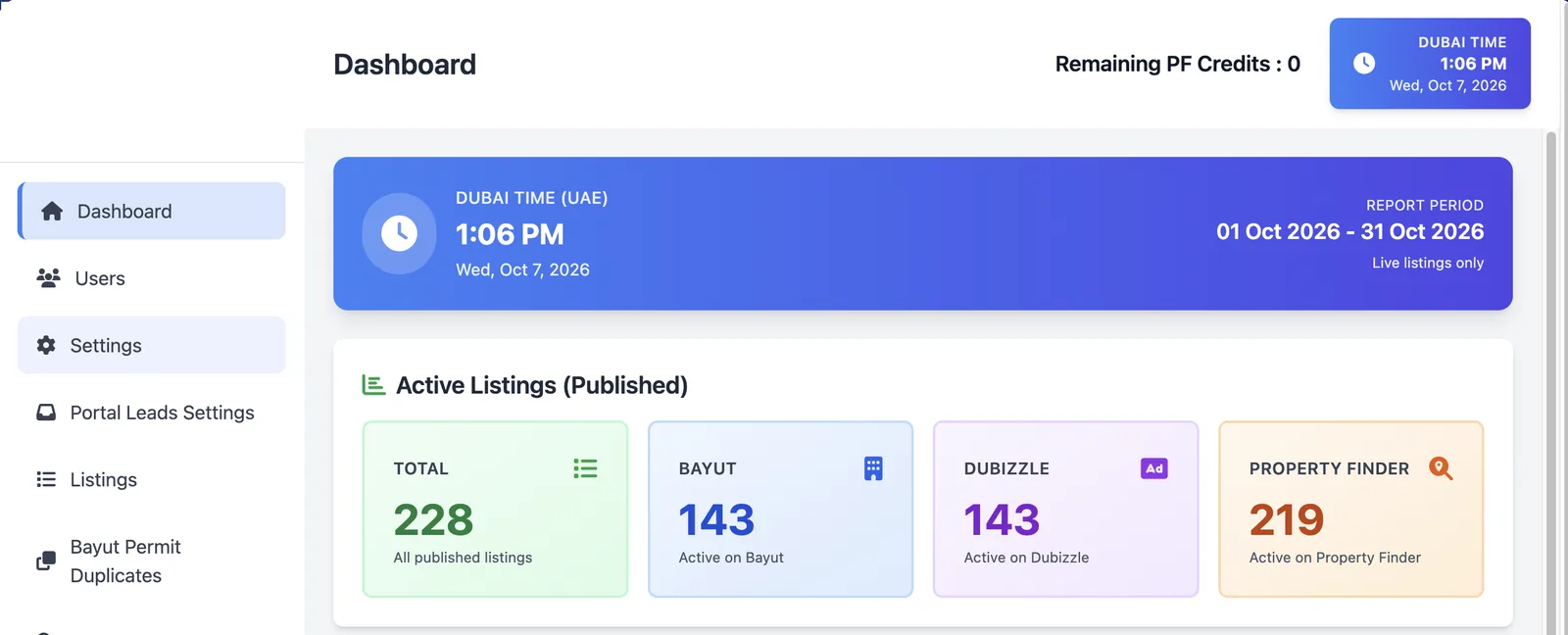
If you publish listings from the CRM as well, ask to see that working. This is the Listing Hub dashboard in our setup, with live listings per portal in one view.
WhatsApp and calls
If WhatsApp chats stay on agents' personal phones, they leave when the agent leaves. Ask the partner how WhatsApp will connect to Bitrix24, whether chats attach to the lead or deal, and how templates and opt-outs are handled. We cover our approach on the WhatsApp CRM for real estate page.
For calls, ask whether the partner can connect IP telephony with call recording, so every call is logged on the deal. We do this through CallGear, described on our IP telephony for the UAE page.
Who fixes an integration when it stops
Integrations stop working when a portal changes its API or a website form is edited. Ask three questions: who monitors it, how you will know it has stopped, and how quickly it will be fixed. Get the answer in the support agreement, not just in a sales call.
Keep control of access and data
The Bitrix24 account should belong to your company. The partner works inside it with partner rights. That one rule protects you if you ever change partner.
How partner access works
Bitrix24's help article on inviting a partner to your account explains the mechanics. You invite the partner by email from the Invite widget. Partners get administrator rights with some limits: they cannot make other people administrators, dismiss other administrators or switch off two-step authentication for employees. They must turn on two-step authentication within 10 days. Partners do not count towards your plan's user limit. You can have up to 10 active partner users, all from the same partner company, and you dismiss them from their profile when the work ends.
The same article warns against giving administrator rights to anyone who is not an official partner. If a freelancer or a "Bitrix24 expert" asks for your admin login, that is a reason to stop.
Personal data and the UAE PDPL
Your CRM holds names, phone numbers, chat histories and, for some deals, passport and Emirates ID copies. The UAE's personal data protection law, Federal Decree-Law No. 45 of 2021, applies to how you process it. Clyde & Co's summary of the PDPL explains that processing generally needs consent unless an exception applies, and that people can object to direct marketing. Companies in DIFC and ADGM follow their own data protection rules.
Ask the partner to set up, as part of the scope:
- Access rights so each agent sees only their own leads and deals.
- Export switched off for agents, and allowed only for named managers.
- A field that records each contact's source and marketing consent.
- A clear process to delete or anonymise a contact on request.
This is general information, not legal advice. If you handle sensitive or government data, ask a UAE lawyer which rules apply.
CRM support is separate from IT support
A Bitrix24 partner supports your CRM. It does not usually manage your laptops, email accounts, Wi-Fi or antivirus. Make sure someone owns that side too, because a CRM account is only as safe as the devices agents log in from.
Plan training and adoption
The most common reason a CRM fails is not the software. Agents keep working from WhatsApp and spreadsheets, managers stop checking, and within a few months the CRM is a contact list. We explain the pattern in Why Dubai Real Estate Teams Stop Using Their CRM.
What to ask about training
- How many sessions, for whom, and how long? Agents, team leads and admins need different training.
- Will you train us on our own pipelines and data, or on a generic demo?
- Who on our side becomes the internal admin, and what do they learn?
One advantage in Dubai: many agents have already used Bitrix24 at a previous agency. The pipeline view, the activity stream and the mobile app are familiar to them, which shortens training.
Automation does part of the work
Good partners do not rely on agents remembering to follow up. They build rules that create the task, send the reminder and escalate when nothing happens. The same idea works outside real estate: Huge AI's guide to workflow automation for small business walks through use cases such as lead routing and support triage.
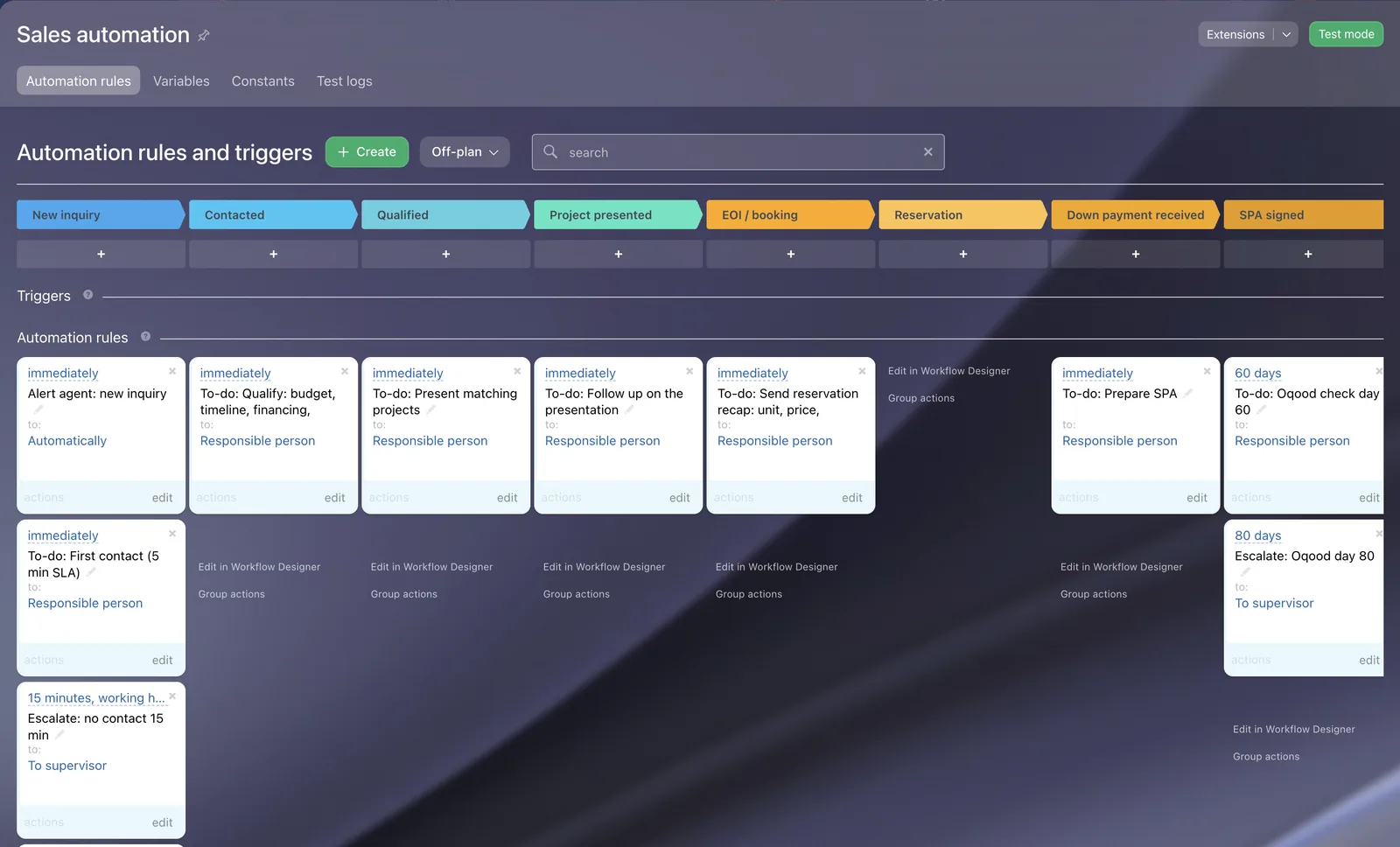
In our Real Estate setup, a new inquiry alerts the agent, creates a first-contact task due in 5 minutes and escalates to the team lead after 15 minutes if nothing has happened. Ask each partner which rules they would build for your first week.
Management visibility
Ask to see the dashboard you will use as an owner. Without speed to lead, conversion by source and activity per agent, you cannot check that the CRM is being used.
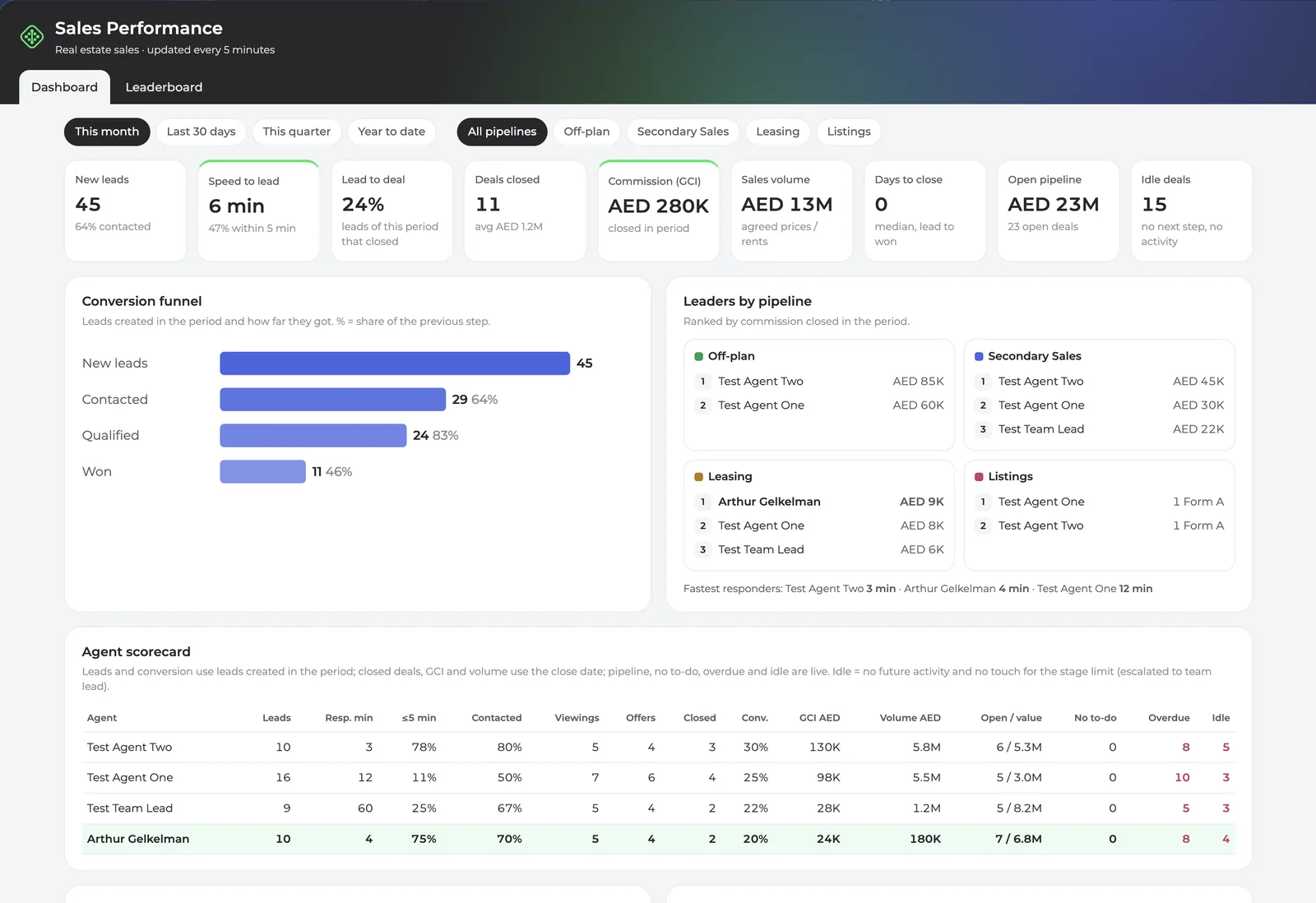
This is the management dashboard we build for brokerages. Whichever partner you choose, ask for something like it on day one.
Agree support after go-live
In the first month you will find fields nobody fills in, a rule that fires too often and new agents who need access. Agree support before you sign.
What the support agreement should say
- Channel and hours: WhatsApp, phone or tickets, and the working hours in Gulf Standard Time. Ask about Fridays and public holidays.
- Response time: how quickly they reply to an urgent issue, such as portal leads not arriving, and to a normal request.
- Named contact: one person who knows your setup, not a general inbox.
- Change requests: how new pipelines, fields or reports are priced and scheduled.
Also ask what comes after the first setup, such as AI call transcripts and scoring with Bitrix24 CoPilot. Our Bitrix24 AI for sales page shows what CoPilot can add once the basics are working.
Red flags to watch for
| Red flag | Why it is a problem | What to do |
|---|---|---|
| Not in the official partner directory | No accountability to Bitrix24 and no verified status | Ask for their directory link before the second meeting |
| Asks for your admin login | Partners should be invited with partner rights | Invite them from the Invite widget instead |
| Account registered in the partner's name | You may lose access to your own data if you part ways | Put the account and subscription in your company's name |
| No written scope | Every disagreement becomes your word against theirs | Do not start until the scope is signed |
| One price, no plan named | You cannot see what you pay Bitrix24 and what you pay the partner | Ask for separate lines |
| Promises of guaranteed sales or ROI | No partner controls your sales | Ask what they will deliver, not what you will earn |
What to ask on the first call
Ask every partner the same ones, so the comparison is fair.
- What is your status in the Bitrix24 partner directory, and can you send the link?
- Which UAE entity will we contract with, and can we see the trade licence?
- Can you show us a live setup for a business like ours, with demo data?
- Which Bitrix24 plan do you recommend, and which features in your setup need it?
- Will the account and subscription be in our company's name?
- What will be working at the end of the first week?
- Which integrations are included, which are extra, and who maintains them?
- How many training sessions are included, and for which roles?
- What are your support hours and response times after go-live?
- What happens if we stop working together?
If you are comparing implementers on more than one platform, our guide to the best CRM consulting companies in Dubai covers Bitrix24, Salesforce, HubSpot and Zoho partners. If you are still choosing between the two platforms most often shortlisted here, our Bitrix24 vs Zoho CRM UAE comparison sets out the differences. For a broader view of what we set up on Bitrix24 for companies outside real estate, see our Bitrix24 implementation in the UAE page.
How we answer these questions
We are a Bitrix24 Gold Partner with 7+ years of experience according to the official partner listing, and we have served around 50 companies. Our Google rating is 4.9 from 7 reviews. For brokerages, we offer a proven Real Estate CRM on Bitrix24 Standard Vibe+, ready in 2 business hours, sold as one annual package with the Bitrix24 subscription and standard setup. Portal and WhatsApp integrations are separate services added after go-live, and we put that in writing before you sign. If you are budgeting for a brokerage, our guide to real estate CRM cost in Dubai compares per-user and flat pricing by team size.
Frequently asked questions
How do I check if a Bitrix24 partner in Dubai is genuine?
Search for the company in the official Bitrix24 partner directory and filter by the United Arab Emirates. The listing shows the partner level and specialisations. Then check their UAE trade licence with the authority that issued it. If a company is not in the directory, treat that as a warning sign and ask why.
Is a Gold Partner always better than a Silver Partner?
Not always. Gold status shows a partner meets higher annual sales and training requirements set by Bitrix24, so they are active and accountable. Fit still matters more: a Silver partner who knows your industry well can be a better choice than a Gold partner who does not. Use status to shortlist and the demo to decide.
Do I have to buy the Bitrix24 licence through the partner?
You can buy a subscription directly from Bitrix24 or through a partner. What matters is that the account is in your company's name and that you know which plan you are paying for. Ask the partner to show the licence and their services as separate lines.
Can I change my Bitrix24 partner later?
Yes, if your company owns the account. An administrator dismisses the current partner users from their profiles and invites the new partner. Bitrix24 allows partner users from only one partner company at a time, so the old partner must be dismissed before the new one is invited.
How long does a Bitrix24 setup take in Dubai?
It depends on scope. A proven template for a standard process can be live the same day. A custom setup with several pipelines, data import and integrations usually takes weeks. Ask each partner what will be working at the end of the first week, and get that in the scope.
Does the 2-hour Real Estate CRM package include portal and WhatsApp integrations?
No. The package covers the Bitrix24 Standard Vibe+ subscription and our standard Real Estate CRM setup. Property Finder, Bayut, Dubizzle and WhatsApp integrations are separate services we add after go-live.
Talk it through with us
If you are shortlisting Bitrix24 partners, we are happy to answer the questions above for your business, and to tell you plainly if another setup would suit you better. Message Digitalz on WhatsApp at +971 50 761 5409, or see what is included in our Real Estate CRM in 2 hours package.