
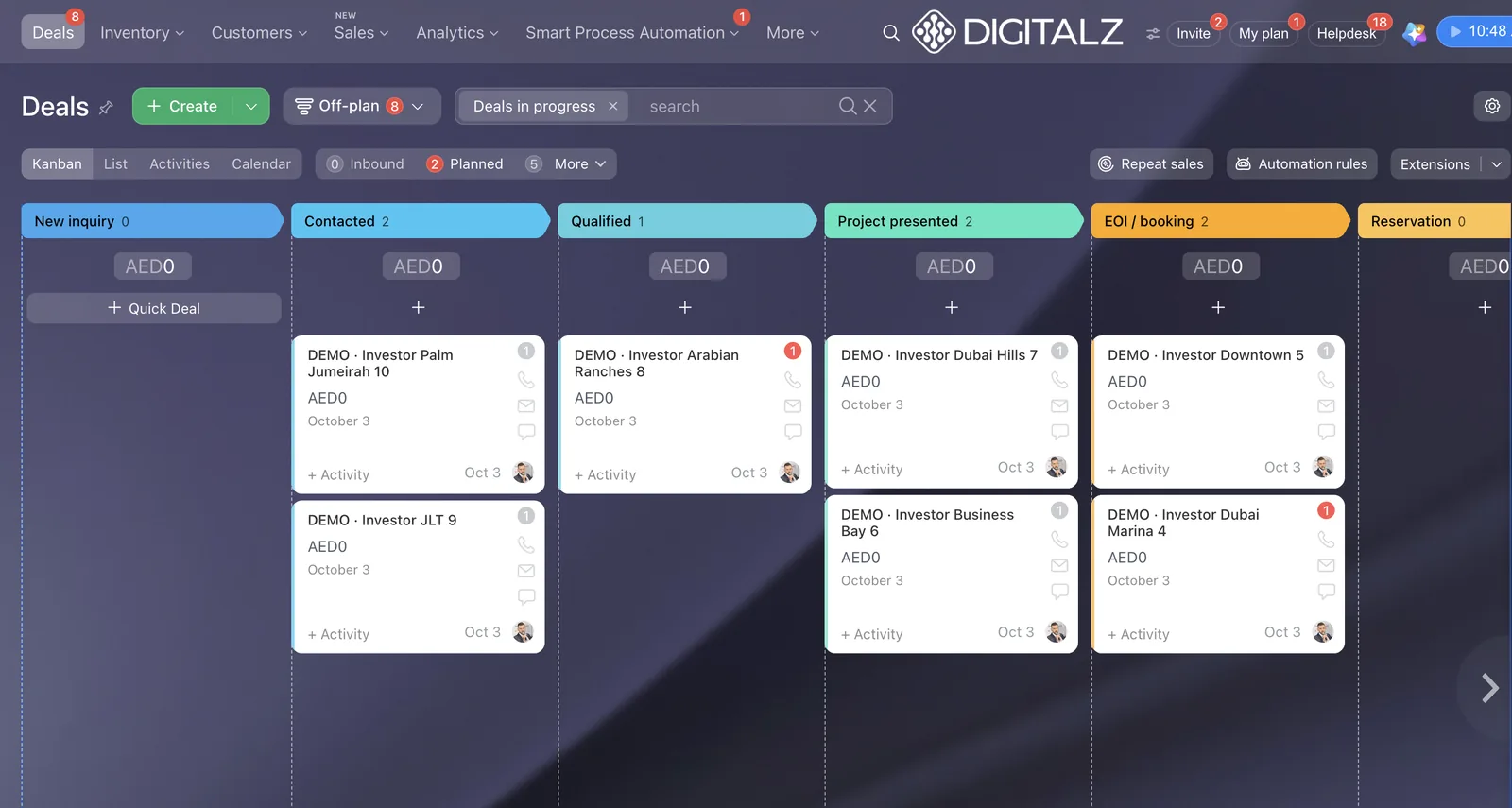
A Bitrix24 real estate pipeline for a Dubai brokerage works best as three separate deal pipelines, not one: off-plan, secondary sales and leasing. Each gets six to nine stages that match the real steps of that deal type, from first enquiry to Oqood, DLD transfer or Ejari, with required fields and automation rules at each stage. Lost deals get a reason, and every pipeline feeds one sales dashboard.
We set up Bitrix24 for UAE brokerages every week at Digitalz, and the pipeline is where most setups go right or wrong. Owners tell us the same things before they start: "Without CRM, we're just lost." "Everybody is messaging everywhere, people forget the leads." "I want to see where the leakage was." A pipeline built on the actual Dubai deal flow fixes all three. This guide gives you the stages we use for each deal type, the fields and automations behind them, and the build order that keeps agents using it.
How pipelines work in Bitrix24
In Bitrix24, a pipeline is a set of stages shown as columns in the CRM Kanban view. Each deal is a card that moves from left to right as the sale progresses. According to the Bitrix24 Helpdesk article on sales pipelines, you can run several pipelines side by side to separate parts of a business, set access permissions per pipeline, and give each one its own deal form. The number of pipelines you can create depends on your Bitrix24 plan.
A new pipeline starts with generic stages such as New, Create papers and Invoice. The first job in a real estate setup is to replace them with words your agents already use: viewing, offer, MOU, NOC, transfer, Ejari.
Three things sit behind every stage:
- Exit criteria. What must be true before a deal moves on.
- Required fields. The data the agent must fill at that stage, and only at that stage.
- Automation rules. Tasks, reminders, messages and alerts that run when a deal enters the stage or sits in it too long.
Why one pipeline for everything fails
Many brokerages start with one pipeline for every deal. It looks simpler. In practice it breaks within weeks, because off-plan, secondary and rental deals do not share the same steps, the same documents or the same speed.
- An off-plan deal goes through EOI, booking, reservation, SPA and Oqood with a developer. There is no seller, no NOC and no DLD transfer at the trustee office.
- A secondary sale needs Form B, viewings, an offer, Form F, a developer NOC, often a mortgage, and a transfer at a DLD trustee office.
- A rental moves in days and ends with a tenancy contract, cheques and Ejari.
Put all three in one board and you get stages that half the deals skip, required fields that make no sense for a tenant, and reports that mix an AED 90,000 annual rent with an AED 3 million villa sale. Separate pipelines give separate numbers, and separate cash flow, per business line.
Leads first, or straight to deals?
Bitrix24 has two places where an enquiry can live: leads and deals. Leads are for qualification: is this a real buyer or tenant, what is the budget, what do they need, who decides, and when. Deals are where the sale happens.
Many Dubai agencies now skip the leads section and create every enquiry as a deal in the first stage of the right pipeline. The reason is simple: agents lose track when they switch between two sections, and portal enquiries usually already name a listing. Our usual approach:
- Straight to deals for Property Finder, Bayut and Dubizzle enquiries, because they carry the listing reference and the listing tells you the pipeline (sale or rent, ready or off-plan).
- A short qualification stage at the start of each pipeline for ad leads from Meta, Google or TikTok, where many contacts are not serious.
Our guide on how to connect Property Finder to Bitrix24 explains how portal enquiries arrive and which agent receives them.
Off-plan pipeline stages
Off-plan sales follow the developer's process and the launch calendar. Speed matters around a launch, and most of the paperwork sits with the developer, so the pipeline tracks the buyer's commitments and the developer's confirmations.
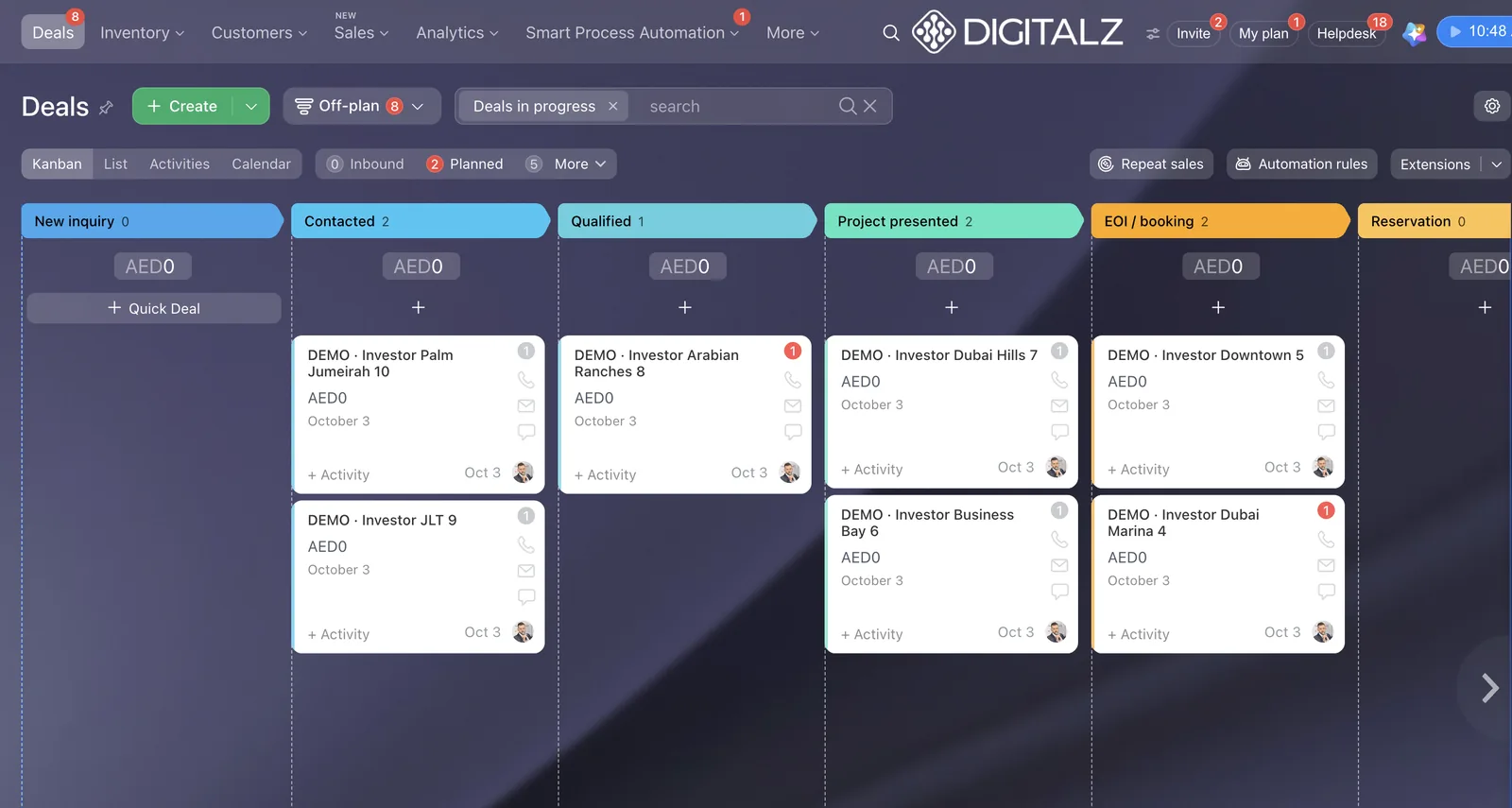
The screenshot shows the off-plan board in our Real Estate setup. Each column is a stage with its own tasks, and the card shows the agent, the project and the next activity.
| Stage | What happens | Required before moving on |
|---|---|---|
| New inquiry | Enquiry arrives from a portal, an ad, the website or WhatsApp | Source, project of interest, assigned agent |
| Contacted and qualified | Agent confirms budget, purpose (end use or investment), timeline and payment method | Budget in AED, purpose, nationality or residency if the developer asks |
| Presentation or site visit | Project brochure, payment plan and a sales centre or show apartment visit | Date of the meeting or visit, units shown |
| EOI or booking | Expression of interest and booking amount for a unit or a launch allocation | Unit or unit type, EOI amount, receipt |
| Reservation | Developer reserves the unit; reservation form signed; KYC and AML documents collected | Unit number, price, passport and ID copies, AML check done |
| Down payment | First instalment under the developer's payment plan | Amount paid, payment date |
| SPA signed | Sale and Purchase Agreement signed by buyer and developer | SPA date, copy uploaded |
| Oqood registered | Developer registers the sale in the DLD interim register | Oqood confirmation |
| Commission received | Invoice to the developer and payment received | Invoice number, amount, date received |
Keep the AML check inside the pipeline as a required field at reservation, not in a separate checklist. Track commission as its own stage too: developers pay when their own conditions are met, often weeks after the SPA, and owners want to see what is outstanding.
Add fields for developer, project and handover quarter so the manager can filter by developer and plan follow-ups for handover.
Secondary sales pipeline stages
A ready property sale has more parties: buyer, seller, often a second agency, a bank and the developer for the NOC. The pipeline has to show where each deal is waiting and on whom.
| Stage | What happens | Required before moving on |
|---|---|---|
| New inquiry | Enquiry on a listing or a general request | Source, listing reference or requirements, agent |
| Qualified | Budget, cash or mortgage, timeline and areas confirmed | Budget, finance type, mortgage pre-approval status |
| Form B signed | Buyer agreement with the brokerage signed | Form B date and expiry |
| Viewing | One or more viewings arranged and done | Viewing dates, properties shown, feedback |
| Offer | Offer made and negotiated with the seller or the seller's agent | Offer amount, counter offer, Form I if another agency is involved |
| MOU (Form F) signed | Memorandum of understanding between buyer and seller; deposit cheque held | Agreed price, Form F date, deposit amount |
| NOC and mortgage | Developer NOC requested; bank valuation and final offer for mortgage buyers | NOC date, valuation result, final offer date |
| Transfer | Transfer at a DLD trustee office; title deed issued to the buyer | Transfer date, title deed number |
| Commission received | Commission invoiced and paid | Invoice, amount, split with co-broker |
"NOC and mortgage" causes most delays. When mortgage buyers are a large share of the business, we split it in two so the manager sees whether a deal waits on the developer or the bank.
Form B and Form A have expiry dates. Store them as date fields and add a reminder before they lapse, so an agent never shows a property or markets a listing on an expired agreement. The seller side, with Form A and the listing itself, belongs in a separate owners pipeline, covered below.
Leasing pipeline stages
Leasing is the fastest deal type in Dubai. Good units go within days, so the leasing pipeline is short and focused on getting the viewing booked and the contract signed.
| Stage | What happens | Required before moving on |
|---|---|---|
| New inquiry | Enquiry on a rental listing | Source, listing, agent |
| Qualified | Budget, move-in date, number of cheques, occupants | Annual budget in AED, move-in date, cheques |
| Viewing | Viewing booked and done | Viewing date, feedback |
| Offer accepted | Landlord accepts rent and cheque terms | Agreed rent, number of cheques, security deposit |
| Contract and payment | Tenancy contract signed; cheques, deposit and commission collected | Contract start and end date, payments received |
| Ejari registered | Tenancy contract registered with Ejari | Ejari number |
Ejari registration is handled through the Dubai Land Department's register and renew tenancy contract service. Once the Ejari number is in the deal, the CRM can create a renewal reminder for the agent around two to three months before the contract end date. That one automation brings back renewals and re-lets that would otherwise go to another agency.
The three pipelines side by side
If you are deciding how to split your Bitrix24 setup, this comparison shows why the three deal types need their own boards.
| Off-plan | Secondary sales | Leasing | |
|---|---|---|---|
| Typical stages | 8 to 9 | 8 to 9 | 5 to 6 |
| Main counterparty | Developer | Seller, seller's agent, bank | Landlord |
| Key documents | EOI, reservation form, SPA, Oqood | Form B, Form F, NOC, title deed | Tenancy contract, cheques, Ejari |
| Speed | Bursts around launches | Weeks to months | Days |
| Where deals stall | Between EOI and reservation | NOC and mortgage | Between viewing and offer |
| Commission source | Developer | Buyer, seller or both | Tenant, landlord or both |
| Key automation | Launch follow-up, payment reminders | Form B and Form A expiry, NOC chasers | Ejari renewal reminder |
Lost stages and lost reasons
Every pipeline ends in two places: won or lost. The lost side is where most brokerages leave money on the table, because "lost" with no detail tells you nothing.
Make the lost reason a required field with a short fixed list:
- Budget too low or too expensive. If this dominates, your ads or portal listings are reaching the wrong budget.
- No suitable property. An inventory gap, or the agent is not matching well.
- No answer after follow-up. A response speed problem, or a weak lead source.
- Bought or rented through another agency. Check speed and follow-up on these deals.
- Not ready yet. Move to a nurture pool, not the bin.
- Fake or duplicate. Useful for judging lead sources and for feeding back to ad platforms.
Read lost reasons by source and by agent once a month. This is the "leakage" report owners ask for, and it only exists if the field is mandatory.
Supporting pipelines: owners and lead pools
The three deal pipelines cover buyers and tenants. Two supporting pipelines cover the rest of the business.
Owners pipeline
A pipeline for landlords and sellers: prospect, contacted, valuation or market appraisal, Form A signed, listing live, and listing closed. This is where seller prospecting lives, and where Form A expiry dates are tracked. When the listing goes live, it can be published from the CRM.
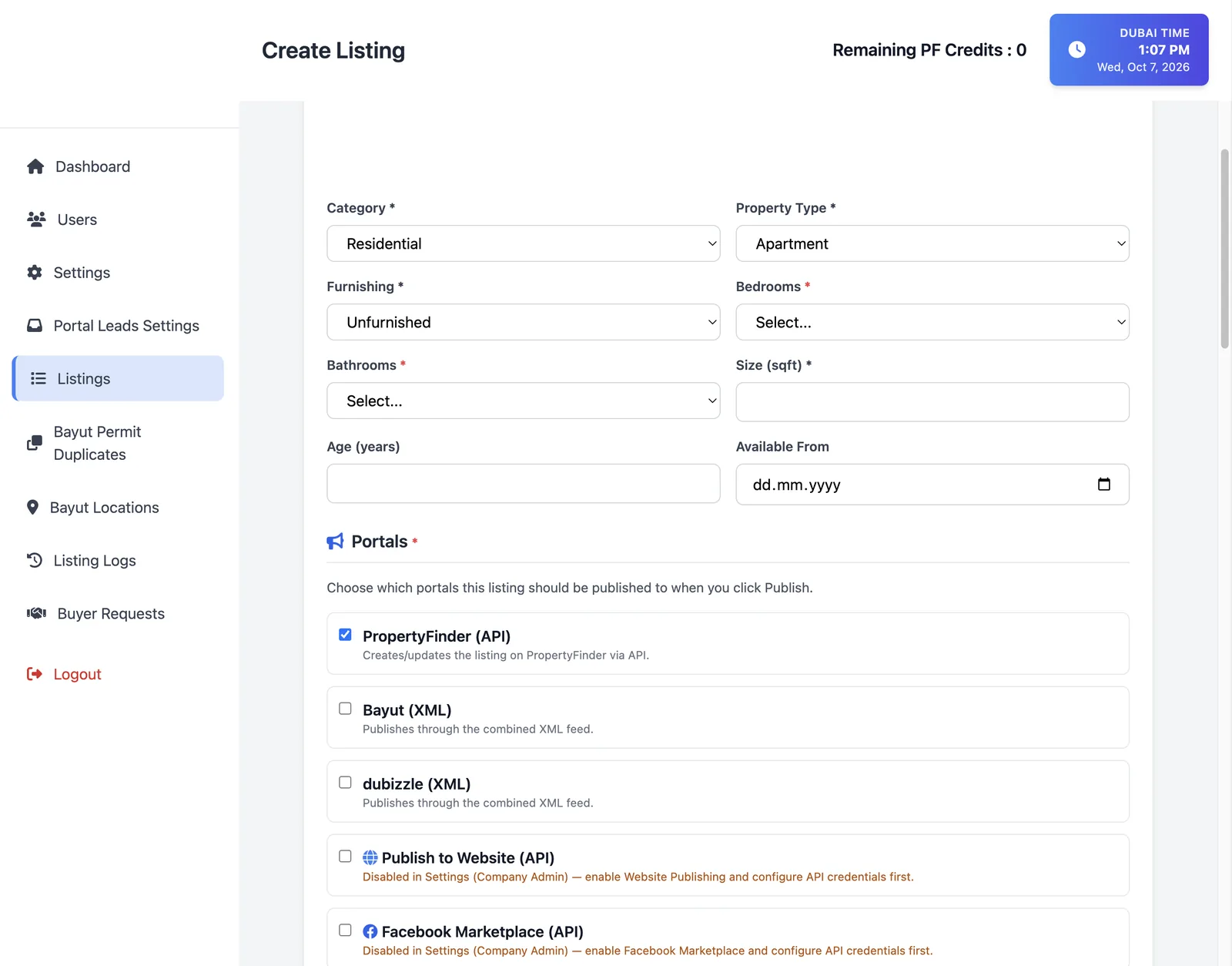
With a listing module connected, one entry with English and Arabic titles can be approved by an admin and published to the portals and the website, and unpublished when the property is sold or let. Portal publishing and lead import are separate integrations added after go-live: see our Property Finder CRM integration and Bayut and Dubizzle CRM integration.
Lead pool
Leads that did not respond or said "not now" move to a shared pool after around 30 days. A senior agent or a re-engagement campaign works that pool when new launches or price drops come up. This keeps the main boards clean without throwing contacts away.
Automation rules per stage
Stages tell you where a deal is. Automation rules make sure something happens there. The Bitrix24 Helpdesk describes automation rules as actions that run when an item reaches a stage, immediately or after a delay, and only for items that match conditions you set. Availability depends on your plan.
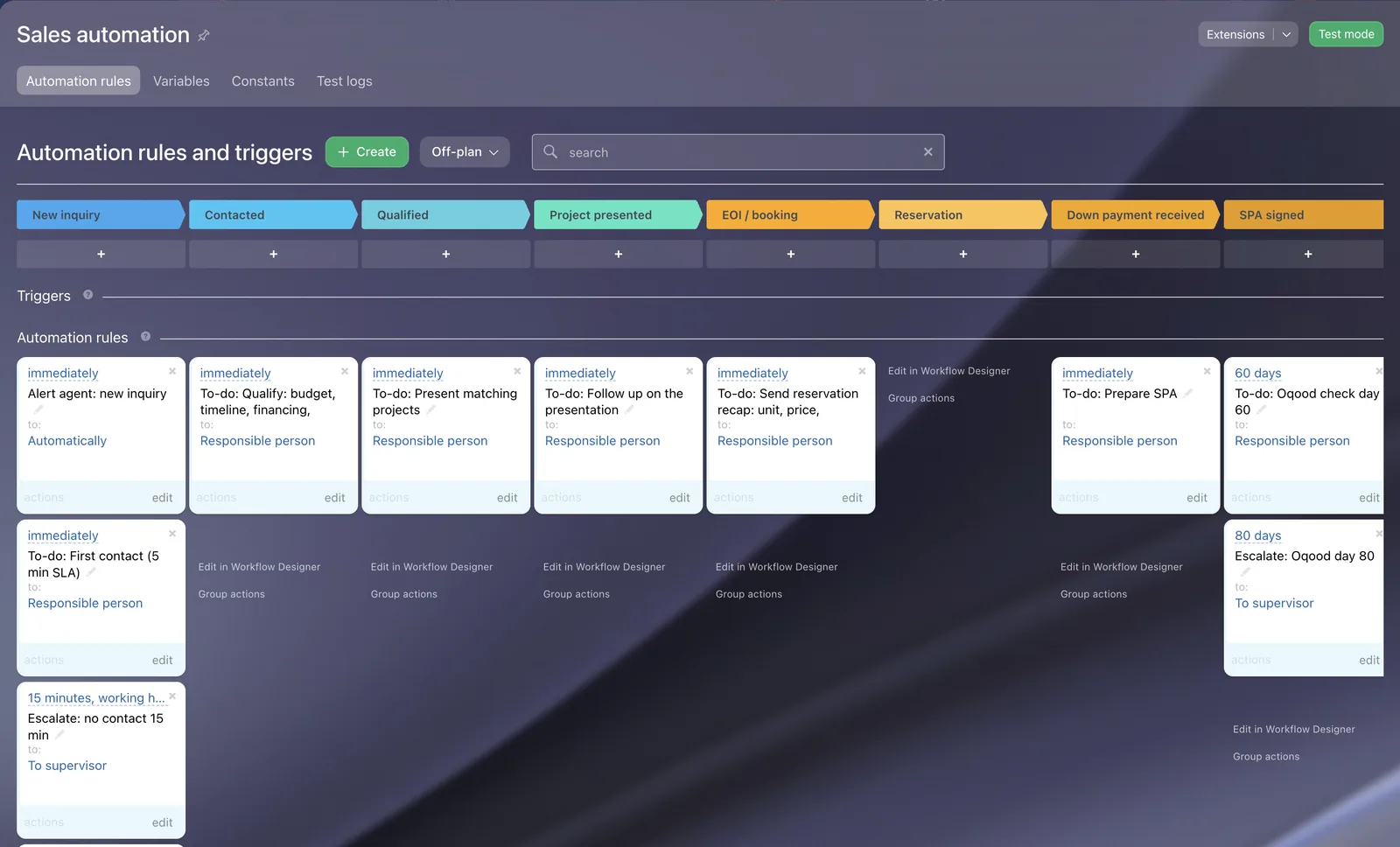
These are the rules we set on the off-plan pipeline's first stage: an alert when a new enquiry arrives, a first-contact task due in 5 minutes, and escalation to the team lead after 15 minutes. The table shows the rules we most often add across the three pipelines.
| Stage | Automation rule | Why |
|---|---|---|
| New inquiry | Notify the agent, create a call task, escalate if no activity in 15 minutes | Speed to lead on paid enquiries |
| New inquiry (ad leads) | Reassign to the next agent after 15 to 30 minutes, with a night pause | Company-paid leads should not wait on one agent |
| Qualified | Send a WhatsApp template with the agent's details | Gives the client a named contact |
| Viewing | Reminder to the agent and client the day before; feedback task after | Fewer no-shows, feedback recorded |
| Form B or Form A signed | Reminder before the expiry date | No work on expired agreements |
| MOU signed | Tasks for NOC request and mortgage documents | Moves the slowest part of the deal along |
| Any stage, idle | Alert the manager if a deal sits too long in one stage | Shows stuck deals before they go cold |
| Ejari registered | Renewal task before the contract ends | Brings back renewals and re-lets |
| Lost | Require a lost reason; move "not ready" deals to the pool | Feeds the leakage report |
Keep the first version lean. Five or six rules that agents trust beat thirty that send noise.
WhatsApp matters here because most client conversations in Dubai happen there. With WhatsApp connected to Bitrix24, chats sit on the deal card, so the manager can see whether the agent actually followed up at each stage.
Permissions and reporting
Who sees what
Permissions are set per pipeline, which suits brokerages with separate teams. Our usual pattern:
- Agents see only their own deals in the pipelines they work in.
- Team leads see their team's deals.
- The owner and admins see everything.
- Export is denied for agents, and the deal history keeps old values if someone edits a phone number.
When an agent leaves, their deals, contacts and chat history stay in the CRM and the manager reassigns them. Because buyer phone numbers and ID copies are personal data under the UAE's data protection laws, limiting who can see and export them is part of good practice, not only of good management.
What the dashboard should show
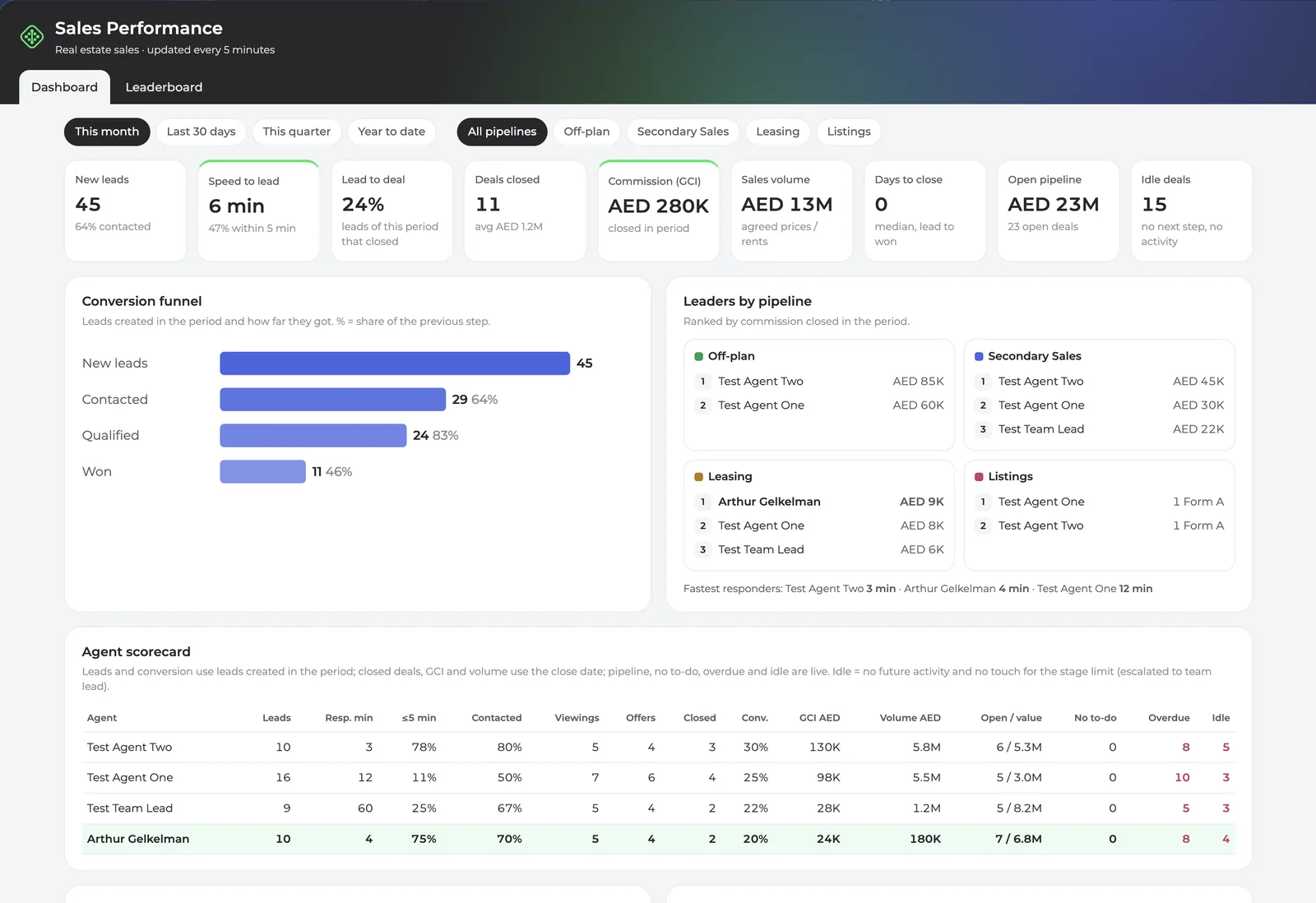
With clear stages, the conversion funnel means something: enquiry to viewing, viewing to offer, offer to MOU or reservation, then closing. The manager can see speed to lead, deals per stage, stuck deals and conversion per agent on one screen. Start with the standard reports and add custom ones only when a number is missing.
With call recording through IP telephony in the UAE and Bitrix24 AI (CoPilot), calls can be transcribed and summarised on the deal card, which helps team leads see what was promised at each stage.
The build order we use
This sequence avoids rebuilding stages after agents are already using them.
- Agree the deal types. Off-plan, secondary, leasing, and whether you need commercial or property management separately.
- Write the stages on paper first. Six to nine per pipeline, each one a step that changes what the agent does next.
- Define exit criteria and required fields. Only the fields needed at that stage. Agents abandon forms with twenty fields on the first screen.
- Create the pipelines and stages in Bitrix24. Rename the default stages; set colours so won, lost and waiting stages are easy to spot.
- Add lost reasons. A short required list for every pipeline.
- Set routing. Portal leads to the listing agent, ad leads by round robin, language teams kept separate.
- Add automation rules. First contact, escalation, viewing reminders, expiry reminders, renewal tasks.
- Set permissions. Per pipeline and per role; deny export for agents.
- Build the dashboard. Speed to lead, deals by stage, conversion, lost reasons.
- Connect integrations one by one. Portals, WhatsApp and telephony, each tested before the next.
- Train with short recorded videos. New hires watch them on day one. Expect two to three months before the whole team works fully in the CRM.
If you would rather not start from an empty portal, our Real Estate CRM in 2 business hours gives you a proven pipeline structure, stages and dashboards on Bitrix24 Standard Vibe+ as one annual package. Portal and WhatsApp integrations are separate services added after go-live. Many Dubai agents have already used Bitrix24 at a previous agency, which shortens training. For a wider look at what a CRM does for an agency, see our guide to CRM for real estate in Dubai, and for budgets, our breakdown of real estate CRM cost in Dubai.
Common pipeline mistakes
- Too many stages. Fifteen stages means agents drag cards across five at a time and the data means nothing. If a stage does not change the next action, merge it.
- Required fields too early. Asking for passport copies at the new inquiry stage makes agents leave the card empty. Ask at reservation or MOU.
- Reshuffling portal leads. Moving a listing agent's portal deal to someone else causes commission disputes. Escalate to the team lead instead.
- No lost reason. Without it, you cannot tell a bad lead source from a slow agent.
- Commission outside the CRM. If commission lives in a spreadsheet, the owner cannot see outstanding developer payments or agent splits. Track it as a stage with fields.
Frequently asked questions
How many pipelines should a Dubai brokerage have in Bitrix24?
Most brokerages need three deal pipelines: off-plan, secondary sales and leasing. Many add an owners pipeline for seller and landlord prospecting. The number of pipelines you can create depends on your Bitrix24 plan, so check this before you design the structure.
How many stages should each pipeline have?
Six to nine for sales pipelines and five to six for leasing. Each stage should change what the agent does next. If two stages always happen together, merge them.
Should we use leads or go straight to deals?
Many Dubai agencies now create portal enquiries straight as deals, because they already name a listing and agents lose track when switching sections. Use leads, or a short qualification stage, for high-volume ad campaigns where many contacts are not serious.
Can agents see only their own deals?
Yes. Bitrix24 permissions can be set per pipeline and per role, so agents see only their own deals, team leads see their team, and the owner sees everything. You can also deny export, and the history keeps old values if a contact is edited.
Can the pipeline track RERA forms and Ejari?
Yes. Store Form A, Form B and Form F dates, the Ejari number and contract end dates as fields on the deal. Automation rules can then remind agents before a Form A or Form B expires and before a tenancy contract ends.
Can we change the pipeline after go-live?
Yes. Stages can be renamed, added or reordered later. Change them with care: deals already in a stage you remove need to be moved first, and reports will compare old and new stages. It is easier to agree the stages on paper before the build.
Next step
A good Bitrix24 real estate pipeline mirrors how deals actually close in Dubai: separate boards for off-plan, secondary and leasing, short stages with clear exit criteria, required fields where they matter, and automation that keeps every deal moving. Lost reasons and a simple dashboard then show you where deals leak.
Digitalz is a Bitrix24 Gold Partner with 7+ years of experience and around 50 companies served, most of them UAE real estate brokerages. If you would like us to review your current pipeline or show you how these stages look in a working Bitrix24 portal, message us on WhatsApp at +971 50 761 5409, or see our Real Estate CRM in 2 hours package for the current annual price.