
WhatsApp marketing in Dubai works when three things are in place: people have opted in to hear from you, you send through the official WhatsApp Business Platform with approved templates, and every reply lands in your CRM where someone owns it. Get those right and WhatsApp becomes one of the quickest ways to reach buyers who asked to hear from you. Get them wrong and you risk blocked numbers, wasted message fees and fines under the UAE's telemarketing rules.
We are Digitalz, a Dubai-based Bitrix24 Gold Partner. We set up Bitrix24 for UAE companies every week, mostly real estate brokerages, and connect WhatsApp to it as a separate service. Below are the 10 rules we work to, with the UAE laws, Meta's current pricing model and the CRM setup behind each one.
1. Pick the right WhatsApp tool
There are two business versions of WhatsApp, and most problems we see in Dubai start with using the wrong one.
| Point | WhatsApp Business app | WhatsApp Business Platform (API) |
|---|---|---|
| Who it suits | One person or a very small team | Teams of agents sharing one company number |
| Where it runs | A phone, plus linked devices | Through a provider or a CRM connector |
| Bulk messages | Broadcast lists, limited to contacts who saved your number | Approved templates sent to opted-in contacts |
| CRM link | Limited | Full: chats attached to leads and deals |
| Cost | Free app | Meta charges per delivered message, plus provider fees |
| Who owns the chats | Whoever holds the phone | The company |
For a brokerage with more than three or four agents, the Platform is the safer choice. When an agent leaves, their conversations with buyers and landlords stay with you. With the app on personal phones, they usually leave with the agent.
2. Collect and record opt-in
WhatsApp's own Business Messaging Policy says you may contact people only if they gave you their number and you have opt-in permission confirming they want to receive messages from you. It also says you must respect every request to stop, whether it comes on WhatsApp or anywhere else.
UAE law points the same way. The UAE Personal Data Protection Law (Federal Decree-Law No. 45 of 2021) generally requires consent to process personal data, and lets people object to direct marketing, as Clyde & Co explains in its summary of the PDPL. Companies in DIFC and ADGM follow their own data protection rules.
Where opt-in usually comes from in Dubai
- A Property Finder, Bayut or Dubizzle enquiry where the buyer chose WhatsApp as the contact method.
- A website form with an unticked box for WhatsApp updates.
- A click-to-WhatsApp ad, where the person messages you first.
- A message at a viewing or event: "Can we send you new launches in Dubai Hills on WhatsApp?" with the answer saved.
How to record it
Store opt-in as a field on the contact in your CRM: yes or no, the date, the source and the message categories agreed (new listings, payment reminders, market updates). When someone replies "stop", an automation rule should switch the field to no and remove them from every future campaign. That one field is your answer if anyone ever asks how you got their consent.
Example opt-in wording
Keep the wording plain and specific, so the person knows what they are agreeing to. For a website form: "Send me new listings and viewing updates on WhatsApp. I can reply STOP at any time." For a viewing: "Would you like us to send similar properties in this area on WhatsApp?" Save the answer in the CRM straight away, not in the agent's notes.
3. Follow the UAE telemarketing rules
In 2024 the UAE Cabinet issued Resolution No. 56 on telemarketing and Resolution No. 57 on the penalties, effective from 27 August 2024. According to Middle East Briefing's summary of the rules, telemarketing covers marketing text messages and promotional messages sent through social media, not only calls. The key points it lists:
- Get consent before telemarketing.
- Do not contact numbers on the Do Not Call Registry (DNCR).
- Stop contacting people who decline further communication.
- Marketing calls are allowed only between 9:00 and 18:00.
- Fines for businesses contacting DNCR-listed consumers start at AED 50,000 and rise to AED 150,000 from the third violation, with possible suspension or licence revocation.
The summary is clear on calls and less detailed on how each rule applies to every message type. Our advice: keep promotional WhatsApp messages inside 9:00 to 18:00 as well, never message a purchased list, and never send marketing from an agent's personal number. This is general information, not legal advice; for your own case, check the official resolutions or ask a UAE lawyer.
4. Understand how Meta charges
Since 1 July 2025, Meta charges per delivered message on the WhatsApp Business Platform, according to its official pricing documentation. The rate depends on the message category and the recipient's country code. Meta can change pricing only on the first day of a quarter, and the current rate card took effect on 1 October 2026, so check the UAE rates before you plan a campaign.
| Message type | When it is charged | Typical use in a brokerage |
|---|---|---|
| Marketing template | Charged per delivered message | New launch, price drop, open house invite |
| Utility template | Charged per delivered message, including inside an open customer service window since 1 October 2026 | Viewing confirmation, document reminder, payment plan reminder |
| Authentication template | Charged per delivered message | One-time passcodes for a client portal |
| Free-form (service) reply | Can only be sent inside the 24-hour window after the customer messages you; Meta's page says it charges from the 1,001st service message each month per business phone number | Answering questions, sending a floor plan or brochure |
Two windows matter. When a customer messages you, a 24-hour customer service window opens, and only then can you send free-form replies. When someone messages you from a click-to-WhatsApp ad and you reply, a free entry point window opens. Meta's page says it can stay open for up to 7 days, and while it is open Meta does not charge for marketing, utility, authentication or service messages.
The lesson: the cheapest WhatsApp marketing is fast replies to people who wrote first. Broadcasting marketing templates to cold lists costs the most and carries the most risk.
A simple way to plan the budget
Before a campaign, count three groups in your CRM: contacts with an open free entry point window from a click-to-WhatsApp ad (free), contacts with an open 24-hour window (free-form replies, charged only beyond Meta's service message allowance), and opted-in contacts you want to reach with a marketing template (charged). The third group is where most of the cost sits. Multiply it by Meta's current UAE marketing rate, add your provider fee, and you have the cost of the send before you press the button. If that number looks high for the result you expect, shrink the segment rather than the message quality.
5. Write templates that get approved
Any message you start outside the 24-hour window must be an approved template. Meta reviews each one and assigns a category. Templates that look like advertising get the marketing category even if you submit them as utility.
What works for UAE templates
- Short and specific. "Hi Sara, the 2-bedroom in Dubai Hills you asked about is available for viewing this week. Would Tuesday or Wednesday suit you?" The name and the area are variables your CRM fills in for each contact.
- English and Arabic versions. Submit both, and send the one that matches the language the contact used.
- A clear reason for the message. Link it to something the person asked for: a listing, a viewing, a payment plan.
- An easy way out. Add a quick-reply button such as "Stop updates", and connect it to your opt-in field.
What to avoid
- Guaranteed returns or yields on off-plan property.
- Unverified claims such as "best price in Dubai".
- Links to unknown short URLs.
- Sending the same marketing template to the same person every few days.
6. Connect WhatsApp to your CRM
WhatsApp on its own is a chat tool. Connected to a CRM, it becomes a sales process: every conversation belongs to a lead or deal, every lead has an owner and every owner has a next step.
In Bitrix24, WhatsApp comes into Open Channels alongside website chat, Instagram and Telegram. A new conversation creates or matches a lead, assigns it to an agent and keeps the full history on the deal card. Team leads can read the conversation without asking for the agent's phone. We set this up as a separate service; see how on our WhatsApp CRM for real estate page, and the full list of CRM integrations we connect for UAE companies.
Digitalz WhatsApp Connect: our own integration
We also built our own connector, Digitalz WhatsApp Connect for Bitrix24. It links your existing WhatsApp or WhatsApp Business number to Bitrix24 as a linked device, the same way WhatsApp Web works. Chats arrive in Bitrix24 Open Channels and are saved on the lead, contact or deal card.
- Agents reply from Bitrix24 in the browser or the Bitrix24 mobile app, and the client receives the message on WhatsApp from your number.
- Messages sent from the phone are saved to Bitrix24 too, so the history stays complete when an agent leaves.
- Bitrix24 automation rules can send WhatsApp messages from your number: a welcome message for a new lead, viewing confirmations, reminders, and payment or document notifications.
- Each number connects separately and can go to its own open channel and team, for example one for off-plan and one for leasing.
- Setup is three steps: we install the app in your Bitrix24, you scan a QR code to link your number, and you choose the open channel.
Because it is not the official WhatsApp Business Platform, there is no Meta template approval and no per-message fee. It is built for day-to-day conversations with clients and leads who contacted you, not for mass broadcasts to cold lists, which WhatsApp may restrict. For large template campaigns to opted-in contacts, use the Business Platform. The current price per number is on the integration page.
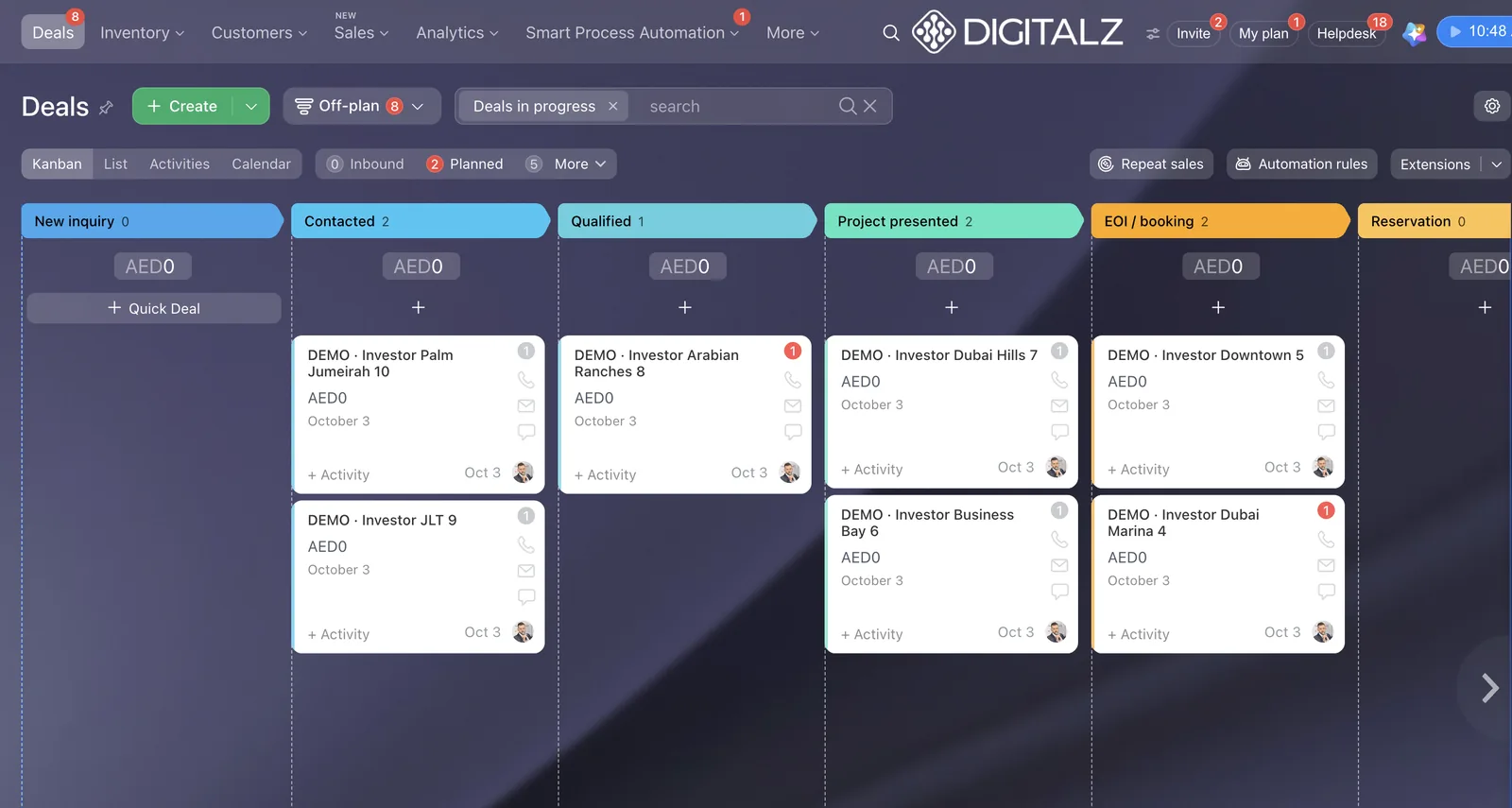
This is the off-plan pipeline from our Real Estate setup in Bitrix24, with demo data. When a WhatsApp enquiry arrives, it lands in the New inquiry column with its source. From there the agent moves it through qualification, viewing, offer and reservation, and the chat history moves with it.
What to check in any WhatsApp CRM connection
- Does one company number work for all agents, with chats routed to the right person?
- Are chats attached to the existing contact, or does every message create a duplicate?
- Can you send approved templates from the CRM, with the opt-in field checked first?
- Do managers see unanswered chats and response times?
- What happens to an agent's chats when they leave or go on leave?
7. Reply within 5 minutes
A buyer who sends a WhatsApp from a Property Finder or Bayut listing often messages several agencies at the same time. The first agent who answers properly usually gets the viewing. That is why we build every Real Estate setup around a first-contact deadline.
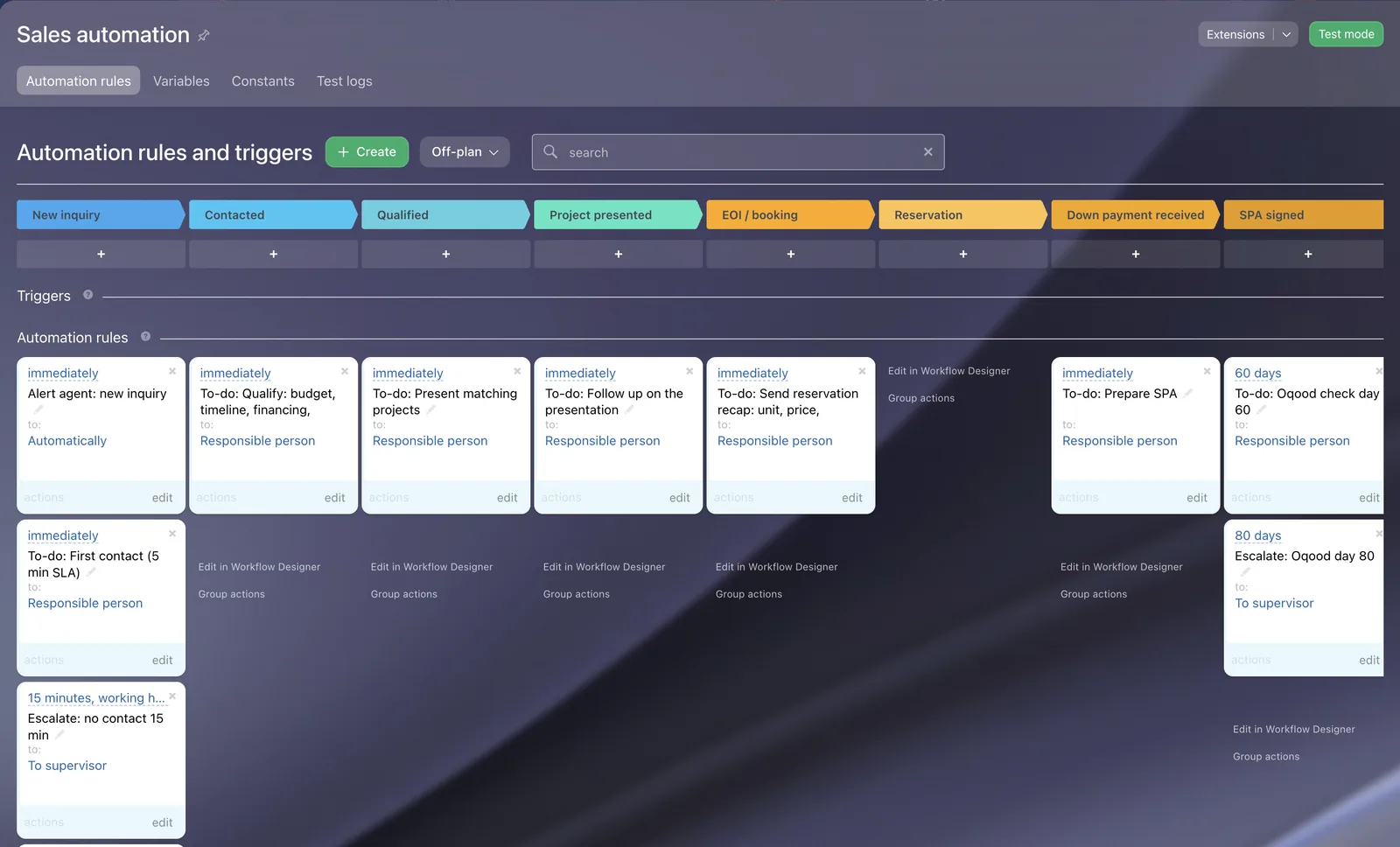
These are the automation rules in our Bitrix24 setup: a new inquiry alerts the agent, a first-contact task is due in 5 minutes, and if nothing happens in 15 minutes the lead escalates to the team lead. The same logic works for WhatsApp, portal and website leads.
Rules that keep WhatsApp leads moving
- Auto-assign new chats by area, language or pipeline, not to whoever is online.
- Send an instant acknowledgement inside the 24-hour window, then a real reply from the agent.
- Escalate unanswered chats to the team lead.
- After a viewing, create a follow-up task for the next day.
Portal enquiries need the same speed. Our guide on how to connect Property Finder to Bitrix24 shows how to route those leads to agents in the same pipeline.
8. Segment by pipeline, not by list
A single "WhatsApp broadcast list" mixes investors, end users, tenants and landlords. They want different messages, and sending them the same one is the fastest way to get blocked.
| Pipeline | Who is in it | Messages they opted in to |
|---|---|---|
| Off-plan | Investors and end users looking at launches | New launches, payment plan details, Oqood updates |
| Secondary sales | Buyers of ready property | Matching listings, price changes, viewing slots |
| Leasing | Tenants | Matching rentals, viewing slots, Ejari and renewal reminders |
| Listings | Landlords and sellers | Form A renewals, viewing feedback, offers received |
When segments come from pipeline stages and CRM fields (budget, area, bedrooms, language), each message is relevant to the person who gets it. A tenant whose contract ends in 60 days gets a renewal reminder. An off-plan investor who asked about Dubai South gets the next launch there, and nobody else does.
9. Time messages to the UAE calendar
Timing in the UAE follows its own rhythm.
- Working week. The federal government moved to a Saturday and Sunday weekend in 2022, and many private companies followed. Weekday mornings tend to suit business messages; keep promotional sends within 9:00 to 18:00.
- Ramadan. Working hours shorten and evenings get busier. Avoid sending promotions close to iftar.
- Eid. Pause campaigns over Eid, then run a planned follow-up round for leads that went quiet.
- Summer. Many residents travel in July and August. Expect slower replies and adjust follow-up deadlines.
- Launch weeks. Developer launches create bursts of enquiries. Make sure your auto-assignment and escalation rules can handle the volume before the launch, not after.
10. Measure deals, not opens
Open and read rates are easy to report and tell you little. What a brokerage owner needs to know is which WhatsApp conversations turned into viewings, offers and closed deals, and which agents answered fast.
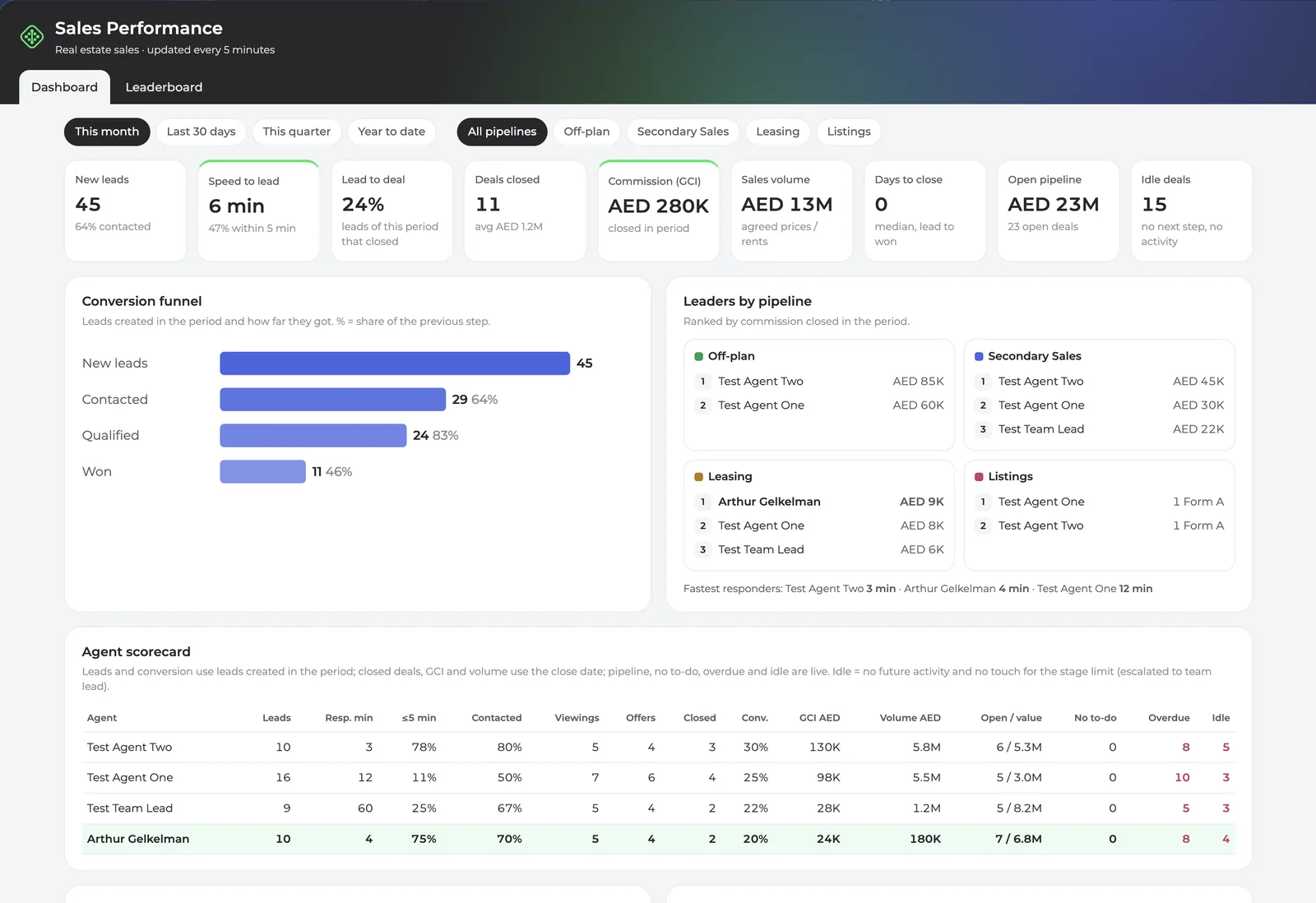
This is the Sales Performance dashboard we build in Bitrix24: new leads by source, speed to lead, deals closed, the conversion funnel and an agent scorecard. With WhatsApp connected, it becomes a source like any other, so you can compare it with portal and website leads.
The five numbers to track
- New WhatsApp conversations per week, by source.
- Median time to first reply.
- Share of conversations that reach a viewing.
- Deals closed where WhatsApp was the first touch.
- Opt-outs and blocks after each campaign.
If opt-outs jump after a campaign, the message or the segment was wrong. Fix that before the next send.
Frequently asked questions
Is WhatsApp marketing legal in the UAE?
Yes, with conditions. You need the person's consent, you must stop when they ask, and you must not contact numbers on the Do Not Call Registry. The 2024 telemarketing resolutions and the UAE PDPL both apply. Check your setup with a UAE lawyer if you are unsure.
Can I send bulk WhatsApp messages from my own phone?
The WhatsApp Business app has broadcast lists, but they reach only contacts who saved your number, and they keep the conversations on one phone. For a sales team, the WhatsApp Business Platform connected to a CRM is the safer and more scalable option. Sending marketing from personal numbers can also breach the UAE telemarketing rules.
How much does WhatsApp marketing cost in the UAE?
Meta charges per delivered message, with rates that depend on the category and the recipient's country. Messages inside a free entry point window from a click-to-WhatsApp ad are free, and free-form replies inside the 24-hour customer service window are free up to Meta's service message allowance. Check Meta's current rate card for UAE numbers, and add your provider or CRM connector fee.
Should WhatsApp messages be in Arabic or English?
Use the language the contact used with you. Many Dubai brokerages work mainly in English, but having approved templates in both English and Arabic is a simple way to match each client.
Can WhatsApp be connected to Bitrix24?
Yes. WhatsApp can come into Bitrix24 Open Channels so every chat is attached to a lead or deal and visible to managers. We add this as a separate service after a Bitrix24 setup goes live, either through the Business Platform or through our own connector, Digitalz WhatsApp Connect.
Is the WhatsApp integration part of the Digitalz 2-hour Real Estate CRM package?
No. The 2-hour package covers the Bitrix24 subscription and the standard Real Estate CRM setup. WhatsApp, Property Finder, Bayut and Dubizzle integrations are separate services we add after go-live.
Talk it through with us
If your agents are still running WhatsApp from personal phones, or you want campaigns that stay inside UAE rules and show up in your sales numbers, we are happy to look at your setup. Message Digitalz on WhatsApp at +971 50 761 5409, or see what is included in our Real Estate CRM in 2 hours package.